Design
Project Decomposition

The system decomposition was done to break the complex application, that is Integrated Workforce Management Platform, into smaller, manageable components with clearly defined responsibilities. This supports maintainability and scalability by allowing each individual part of the system to be designed and implemented independently.
This system initially identified and decomposed Integrated Workforce Management Platform into two high-level components, the ‘client’ and the ‘server’. The Frontend (‘client’) handles the input of data and the user interface, while the Backend (‘server’) separately handles the management and storage of said data and logic required for the core functionality of the application. This follows industry standards in the separation of concerns, ensuring that changes to the user interface do not affect the way data is processed, decisions are made and the data that is provided to the user. This modularisation of the project supports maintainability and scalability directly, enabling systematically separated design and development of individual areas of focus of the project – reducing possible interaction conflicts and improving codebase organisation.
A second layer of decomposition was included, breaking each high-level component into further specific responsibilities. In the case of the Backend, this further decomposition takes two routes, with a Service Layer and a Storage Layer. With the Service Layer handling tasks such as API routes, data validation, shift logic, scheduled background tasks, and authentication, and the Storage Layer enabling the management of data in the database – such as scheduling data, time and payroll data, configuration data, user data, audit data and communication data. This detailed in depth decomposition was implemented as the backend is the most complex area of the project, and the separation of service logic from data storage improves implementation understanding, maintainability and security, reducing risk of the mishandling of data.
On the Frontend, the further decomposition distinguishes the separation of the user interface - responsible for the rendering of the UI and the implementation of user interactions – and data management, responsible for API requests, data validation, and authentication state. This separation ensures visual presentation of the UI and Frontend logic are loosely aligned – allowing interface changes without affecting data ingestion logic and API request composition.
While this project, as any project, had the inherent capability to be decomposed further, this was decided against due to many components already clearly identifying single predefined tasks. For example, the possible inclusions of individual API requests or database table names are grouped directly in the already specified decomposition and would not benefit from additional decomposition. This approach ensures that the design remains clear and understandable – avoiding intricacy while keeping the system highly modular.
Overall, this decomposition transforms a large-scale complex project into minimal components, allowing each individual implementation to be developed, debugged and tested separately, creating an overall project that is more manageable, scalable and extendable for future improvements.
Screen Designs
Below is the screen design section, in which minimal conceptual designs of the frontend application were produced to plan user interaction flows and gather early stakeholder feedback prior to implementation. These designs, rather than being polished UI implementations, focus on layout, usability and accessibility – allowing these specific design decisions to be evaluated and refined prior to development.
Global Design Choices
A consistent visual design is used across all screens conceptual mock-ups to ensure consistency and reduce user confusion throughout usage. This application uses a white background to maximise readability, with light grey content blocks to visualize content and interactive areas from the main page. Input fields and interactive content elements, such as buttons, remain white – allowing the grey content areas to provide a contrasting background for white elements to sit upon, clearly indicating interaction points. While further colours are introduced into the designs, these can be referred to as accent colours and the standards set out above are adhered to throughout.
Login Screen Design
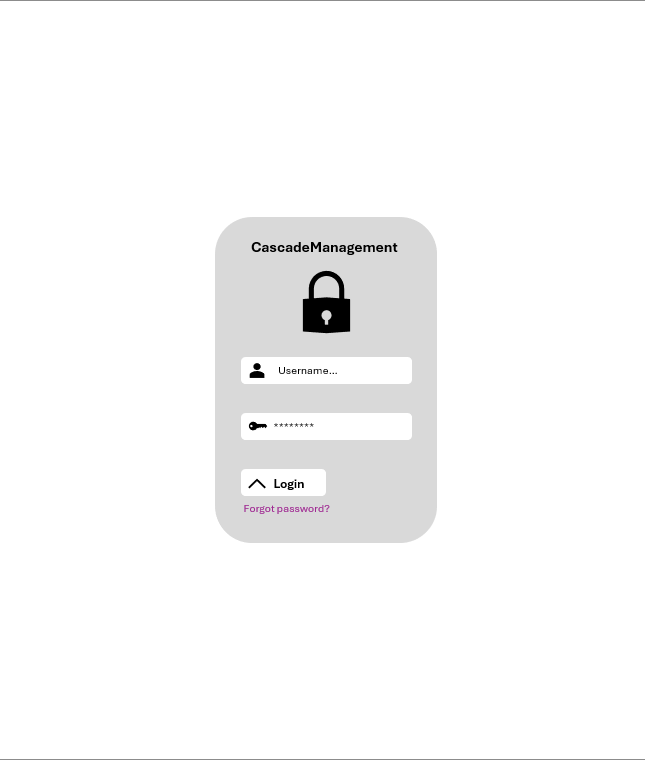
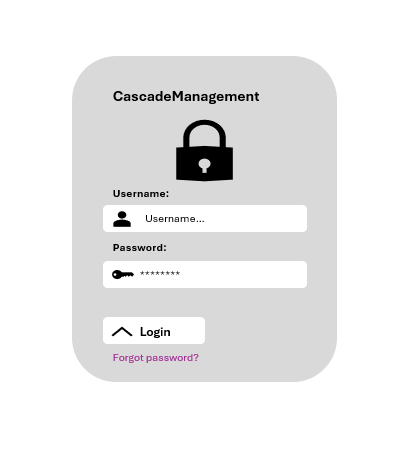
The login interface, shown aside in figure 1, is a single content block centred horizontally and vertically on the page. This ensures minimal user confusion and forces all attention to the authentication form without distractions.
At the top of the block, the project name Integrated Workforce Management Platform is displayed using a larger font size to clearly identify the application and provide reassurance that the user is logging into the correct system. Directly below this title, a large lock icon is displayed to visually reinforce the concept of security and authentication, this icon is decorative and for this mock-up was sourced from open-source icon libraries provided by Microsoft in their suite of applications. In implementation of this icon, a different open-source library would be used which would have direct implementation with chosen frontend frameworks such as ReactJS.
Following this, the username and password input fields are placed below the icon vertically – matching common placement in previously evaluated preexisting solutions and adhering to user expectations. Rather than the explicit inclusion of visible separated text labels above the fields, each field contains descriptive placeholder text (“username…” for the username field and “password…” for the password field) alongside an icon inside the field to clearly indicate the expected input. This combined with descriptive alt text for screen reader compatibility reduces the possibility of visual clutter while maintaining clarity and interaction usability. Furthermore, the inclusion of masked text input in the password field improves security further, reducing the risk of shoulder surfing.
Moving towards the bottom of the design, a login button is visible – clearly marked by its use of two instructive mediums, an arrow icon to signify progression and text displaying “Login”. Being positioned directly below the input fields with no competitive elements, user error is significantly reduced as it is clearly indicated as the primary element on the screen. Directly below this, a small “Forgot Password” option is displayed, utilising a smaller font size and blue formatted text, signifying its nature as a secondary action and its implementation as a clickable link which adheres to web standards stating that a link must have a mechanism that is “available to allow the purpose of each link to be identified from link text alone” .
Employee Area Design
The employee dashboard consists of multiple components and interface elements, each supporting distinct user interactions. For these conceptual designs, only key components and representative pages are illustrated to demonstrate layout, usability, and accessibility. Rather than the production of full mock-ups of each screen, this section focuses on main areas of functionality such as the navigation bar which will be treated as a separate component and the remainder of each page concentrating on page-specific content and interactions.
Navigation
The employee navigation bar is designed as a consistent reproducible element that appears across all employee pages, providing users with quick access to core functionality and reducing confusion that occurs alongside differing design choices. This conceptual design focuses on layout, usability, and accessibility rather than polished visual styling.
As shown above in figure 2, the navigation bar is minimal and adheres to the styling set out prior - with a white background and grey colour used for action blocks. On the left, the navigation bar displays the projects initials “CM” – reinforcing branding and clearly stating the project in use. To the direct right of this, four main navigation items are presented horizontally: one primary item is highlighted within a blue box – indicating clearly the current page the user is on – while the remaining items make use of the colourway outlined above, with a grey colour shown to indicate the pages that the user is not currently on. Furthermore, items with restricted access are shown on the navigation bar if the user has sufficient permissions, as seen by the inclusion of the “Management” navigation element – this is displayed in green, providing a clear visual distinction between employee area navigation elements and management elements. Its highlight in green further reinforces user confidence and reduces confusion, providing the user with a clear indication through its bright colour that access to the restricted page is available to them. Finally, the right-hand side of the navigation bar includes the user profile picture and username, clearly and consistently indicating the status of the user being authenticated. Beside these indicators, a large red logout button is located, designed for clear visibility through its red colouring being a stark contrast from the white background and its clear white text overlayed, allowing for direct, consistent and easy access to logging out throughout the application.

Figure 3 - Employee navbar showing the dashboard as the active page (blue). Includes project initials, user profile picture, username, and a red logout button.
For users without management access the navigation bar would be similar, with the only difference being the removal of the management navigation element as shown above in Figure 3.
Dashboard
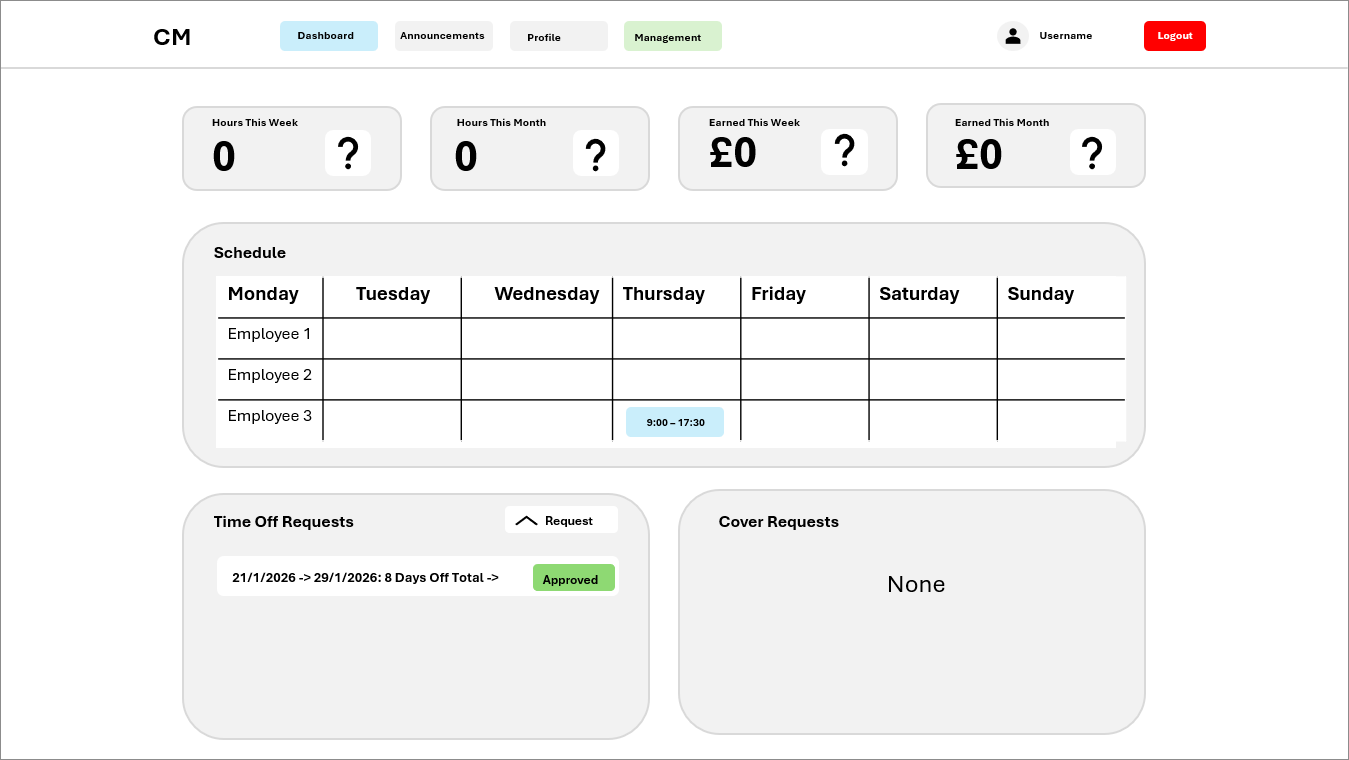
The mock-up for the employee dashboard page aimed to provide a clear overview of key information and interactive components, allowing employee users to view shifts, view past statistics of time worked and take actions in relation to the assignment of shifts, cover requests and PTO/time off requests. As seen in figure 4 below, the employee dashboard page mock-up is presented with the navigation bar at the top of the page with the current page highlighted – ensuring the consistent access of core functions across the dashboard.
Figure 4 - Employee dashboard showing the navigation bar, four top stat boxes, weekly schedule, Time Off Requests block, and Cover Requests block.
Below the navigation bar, the dashboard shows four statistic boxes at the top of the page, displaying hours worked and payment earn for the current week and month. Each individual content box adheres to the styling previously outlined, with a grey background contrasting with the white background of the page. Inside each box a text label indicating the statistic displayed is shown with the statistic itself in large bold text below said label, alongside this a placeholder icon is evident in the mock-up which in final implementation will further increase the clarity of the statistic displayed with the use of directly relevant icons in rather than the placeholder.
Directly beneath the statistic boxes, a schedule content block spans the width of the four stat boxes – providing design consistency. This content block has a clearly defined title stating “schedule” with a proceeding table showing employee names in rows and the days of the week in columns. Scheduled shifts are represented inside this table, through coloured blocks indicating the start and end times, providing a clear overview of team schedules. The colour of these blocks will be determined by the tag assigned to the shift in the management panel during shift creation, in the case of this mock-up the shift block is the default blue colour.
Directly under the schedule, two equal content blocks – both combining to the length of both above sections – provide further functionality. The Time Off Requests block, on the left, displays individual requests in white sub-blocks with green or red status indicators for approval and includes a “Request” button that opens a modal for submitting new requests. The Cover Requests block follows the same structure but replaces the status indicator with an action button for accepting requests; in the current mock-up it displays “None” indicating no active cover requests.
This layout ensures that employees have key metrics, schedules and all-important actions clearly accessible while maintaining consistency with styles outlined above and usability throughout the page.
Announcements
The aim of the announcements page is to provide employees with an overview of all notifications and releases by the management team in a concise, consistent and readable manner. The navigation bar located at the top of the page remains consistent with the rest of the employee pages, with the only difference being the Announcements navigation item being highlighted – indicating it’s the current page.
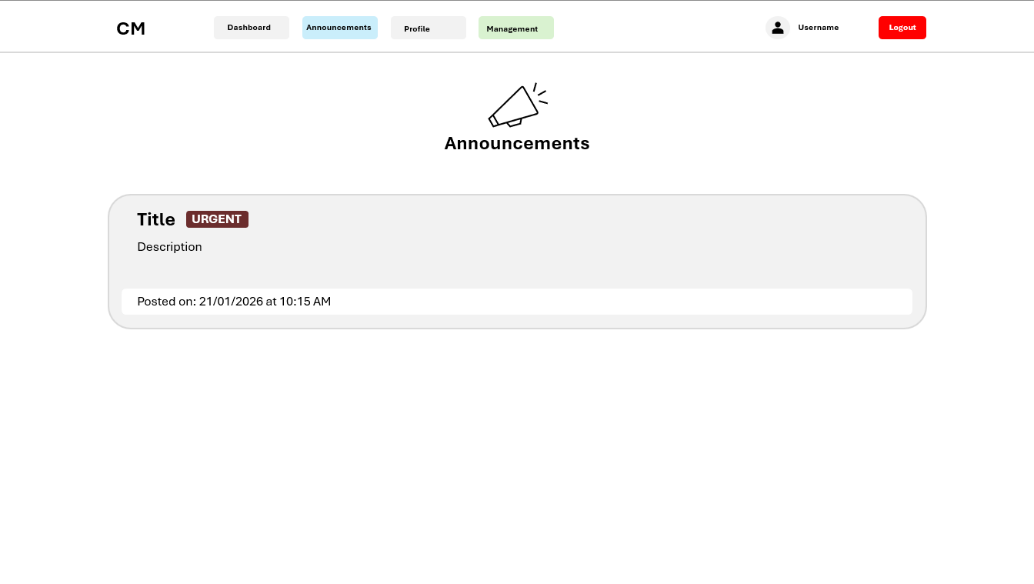
Figure 5 - Employee announcements page showing the navigation bar with Announcements highlighted, a centred megaphone icon with header text, and announcement blocks with urgency indicators, descriptions, and posted date.
Focusing in on the contents of the page, at the top a megaphone icon is centred – used as a visual representation of the current page – with the text “Announcements” displayed directly below in large bold text for clarity and reinforcement of the page’s purpose.
Below this header, individual announcements are listed on the page, displayed as width-spanning content blocks, matching the format and style outlined prior and implemented in other employee screens. Each announcement block is listed on the page vertically, with the possible use of a scrollbar to navigate down the page to view announcements if many are published.
Inside an announcement content block, which is coloured grey to contrast with the white background of the page, there is a title positioned at the top left of the content block indicating in large bold text the chosen title for the announcement. Inline with this, an urgency indicator is located as a small block to the right of the title. In Figure 5 above, the displayed announcement can be seen to be urgent, with the block being coloured red, with white, all-capitalized, text inside the block reading “URGENT”. In implementation of this page, this will be able to be changed dynamically, with different announcements having the ability to signify lower urgency levels, with the inclusion of other colours such as green or amber. Smaller non-boldened text is located below the title and urgency indicator, providing the details of the announcement, as seen by the text “Description” shown in Figure 5. Finally, at the bottom of the announcement content block, a white content-block displays the posting date and time in the format: “Posted On: DD/MM/YYYY at HH:MM AM/PM.”, this content block is the width of the parent block, with padding on all sides to keep spacing consistent.
This design ensures that employees can quickly identify high-priority announcements while maintaining visual consistency, readability, and usability across the interface.
Profile
The employee profile page aims to provide the user with the ability to view and manage personal, contact and account information. The navigation bar, located at the top of the profile page, remains consistent with the other employee pages, with the Profile navigation item highlighted to indicate the current page the user is on, ensuring that users are aware of their location throughout the application.
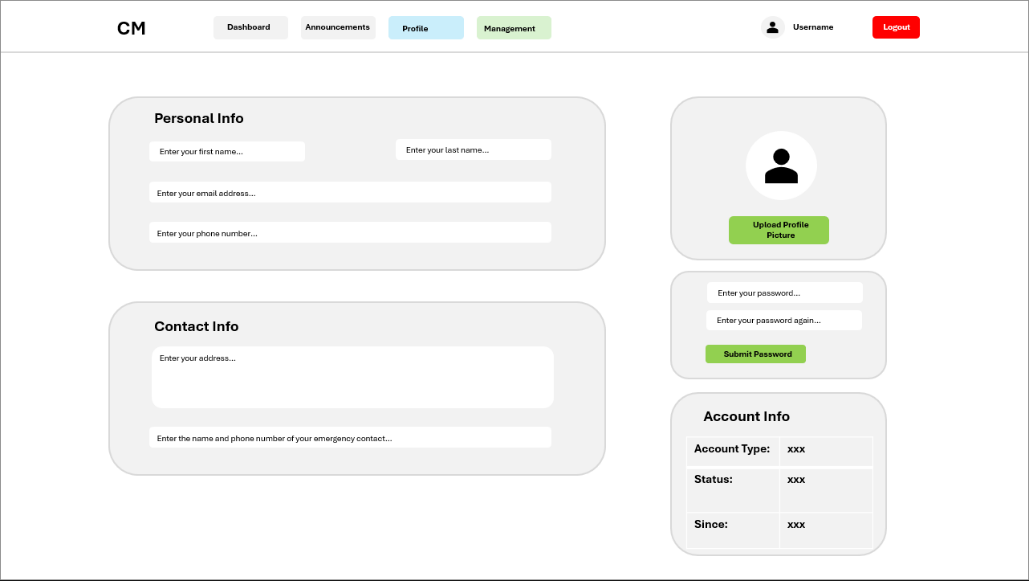
Figure 6 - Employee profile page showing navigation bar with Profile highlighted, personal and contact information fields, profile picture, password update form, and account information block.
The main content area below the navigation bar is divided into thirds, with the two left hand-side content blocks spanning the width of 2/3 of the area and the three right hand-side content blocks being 1/3 of the content area. These content blocks provide visual grouping and clear separation between editable and non-editable content and information.
At the top left of the page the content block titled “Personal Info” in large bold text contains fields first name, last name, email address, and phone number. These fields, with descriptive placeholder text inside them, are styled as per the outlined global design choices, with white backgrounds to contrast with the grey content block, indicating their interactive nature. Directly below the personal info block, the content block titled “Contact Info” spans the same width and contains a large multi-line field for the input of an address, and below a further width-spanning field for the input of emergency contact details. Identically to the personal info content block, these fields have descriptive placeholder text and are displayed with white backgrounds to indicate interactivity and continue consistency. In reducing complexity for the user, the fields in these two content blocks lack submission buttons, with this design leveraging auto save features, allowing the user to simply input the content and have it instantly submitted – reducing confusion of multiple button elements throughout the profile page and as a result reducing user complexity.
Moving to the right of the main content area, three vertically aligned blocks are displayed, with the top one being the profile picture modification block. Inside this content area, a large white circle with a user icon inside are shown in figure 6 above as a placeholder for the user’s profile picture, which in development iteration would be implemented. Directly below the user’s profile picture, a large horizontally centred green “Upload Profile Picture” button provides a clear call to action for updating the image. The placement and colour of the button element reinforce its functionality without overwhelming the page visually. Beneath the aforementioned content block and to the right of the contact information block, the password update block allows users to change their saved password for the account. This block contains dual vertically aligned input fields alongside a green submit button. Both input fields continue to follow predefined design standards, having a white input background to contrast with that of the content block grey background, and descriptive placeholder content indicating field content requirements. Finally, the last content block, located directly below the password update block, is titled “Account Info”, presenting, in table form, non-editable account details, including Account Type, Status, and Since date. A table was chosen to present this information due to prior use in the design of other non-editable views such as the schedule content block, providing consistency to the user and reducing confusion derived from UI discontinuity.
The layout of the profile page prioritises clarity and usability, with grey content blocks providing visual grouping and separation of content. Buttons and interactive elements follow the established accent colour scheme, ensuring that users can quickly identify available actions. Overall, the design allows employees to efficiently access, review, and update personal and account-related information while maintaining visual consistency with the dashboard and announcements pages.
Management Area Design
Rather than the production of full mock-ups for each page used in the management area of the project’s frontend, this section choses to focus on the management navigation and dashboard overview/homepage. These pages were selected as they show the layout and interaction patterns alongside showcasing all input and data display methods used throughout the management area, with the same visual and interaction design conventions, such as consistent use of grey content blocks, white input fields and coloured buttons.
Navigation
Throughout these initial mock-up designs, the management area utilises a horizontal navigation bar at the top of the page, consistent with the navigation method used throughout the employee area. This design choice was made to reduce the differences between the employee and management areas and to increase design continuity.

Figure 7 - Management area showing the horizontal navigation bar with multiple management pages, active page highlighted in blue, employee dashboard navigation highlighted in green, and user authentication details with logout button.
The navigation bar, as seen above in figure 7, continues to use the same design standards outlined previously. On the left the initials of the project can be seen to be listed “CM” identifying the application and reinforcing product awareness. On the far-right side of the navigation bar, a large red logout button is displayed – allowing for direct logout access from any page, reinforcing security on the platform and allowing for the removal of authorization when the application ceases in use.
Beside this, the currently authenticated user’s username and profile picture are displayed, showing the state of the user to be logged in. Between both sets of items on the opposing sides there are 10 navigation items listed (Overview, Employees, Shifts, Announcements, PTO, Cover, Payroll, Tags, Settings and Employee Dashboard). As with the employee navigation bar, the page the user is on is highlighted with a blue accent colour rather than the standard grey – clearly defining where the user is on the webapp as a whole and in turn reducing navigation complexity.
Furthermore, the navigation item used to return to the Employee Dashboard is also highlighted contrastingly, with its background being green. This design choice mirrors the styling of the management access button on the employee dashboard, providing visual consistency and reinforcing the relationship between both areas of the system.
Page Design
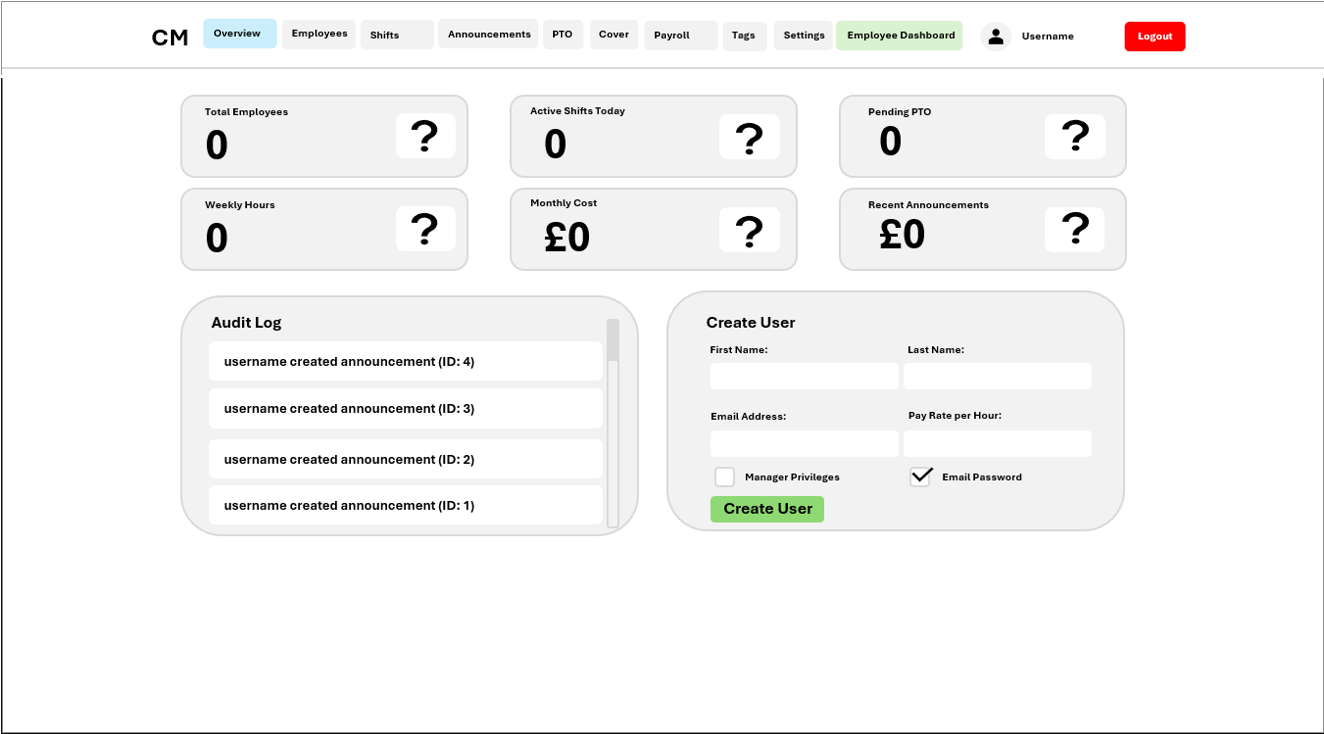
The management overview page, shown below in Figure 8, acts as the primary landing page for users with management permissions throughout the webapp and provides a high-level summary of employee and system information alongside direct access to common actions taken by management users. This page was selected as a representative example within the management area, as it encompasses all core layout structures, data presentation methods and input mechanisms used consistently across the remaining pages.
Figure 8 - Management Area Overview Page (Dashboard Home), demonstrating the standard page layout, input components, and UI patterns used consistently across all management pages.
As shown in Figure 8, the overview page is displayed directly below the aforementioned navigation component, with the Overview page (being the current page) highlighted to maintain clear orientation. The main content area of this page can be seen to be divided into multiple grey content blocks, as per the outlined global design standards. These content blocks visually group information and tasks, allowing administrators to rapidly identify and take actions.
Similarly to the employee dashboard, the top of the management overview page displays statistic boxes, providing key statistics such as total employees, active shifts, pending PTO requests, weekly hours, monthly cost and recent announcements. Due to the decision to include 6 statistic boxes rather than one, the boxes were chosen to be expanded width wise, with 6 boxes spanning two rows and three columns rather than the 4 columns and one row implemented in the employee dashboard. Each statistic box follows the same design pattern as previously in the employee dashboard, with a title stating the statistic the box is displaying and the statistic itself in large bold text on the left and a placeholder icon on the right. This direct mirroring of the statistic boxes from the employee dashboard produces high levels of visual consistency for users while displaying data relevant to management users.
Below the statistic boxes on the left-hand-side, a content block labelled “Audit Log” in bold large text is displayed. This content block takes the same styling as all previous implementations, with a grey background to contrast with the white page. Inside this content block, data is presented in rows, with many white content blocks stretching the width of the parent block containing audit log entry data such as “username created announcement (ID: 4)”. Furthermore, the inclusion of a scroll bar in the audit log content block proves the designs’ ability to scale to mass data amounts, with further entries being revealed as the content is scrolled either down or up.
This audit log content block directly demonstrates the primary method used throughout the management area to display data such as employee lists, shifts and payroll records. While figure 8 lacks the inclusion of action buttons beside data entries, due to audit logs being permanent, this would be implemented in the display of other data types.
To the left of the audit log content box and below the statistic boxes, a content block titled “Create User” is displayed. This content block can be seen to include examples of input mechanisms used across the management area, with inputs of differing datatypes such as plain text (first name and last name), email addresses (email address input), numbers (pay rate per hour) and checkboxes (manager privileges and email password). Furthermore, these inputs displayed in the create user box also adhere directly to previous design implementations, displaying as white boxes that contrast with the grey background, with the differing factor being the inclusion of input labels rather than placeholder text – implemented to retain consistency throughout the page as checkboxes are unable to contain placeholder text. At the bottom of the box, a large green create user button can be found, clearly marking the action available to be taken through its visible difference and contrast from the rest of the page. By demonstrating these input patterns on the overview page, the need to individually document each management screen is reduced.
Overall, the management overview page demonstrates the core visual mock-ups and interactions used consistently throughout the management area. By showcasing summary statistics, data visualisation, and form-based inputs within a single page, this design effectively represents how other management pages operate while maintaining usability and visual consistency across the administrative interface.
Stakeholder Design Feedback & Changes
After the completion of all my initial designs, I presented said designs to my stakeholders to gain feedback and implement any changes deemed necessary for the functionality and usability of my application.
Employee Area
In the case of the Employee Area, the mock-ups were presented to Dylan Sully – a friend with employment in the hospitality industry – who uses competitor products regularly. While generally pleased with the implementation stating that the pages and design had good coherency and the design seemed easy to use, he did explain that the lack of labels for inputs could be confusing for some. He then explained that he tends to use opposing products while preoccupied with other tasks at work, stating that when interrupted, the lack of a label on inputs could cause the loss of his train of thought - leading him to delete the content to view the placeholder, to remind himself of what he was doing.
Taking this advice into account, I created a further mock-up design of the Login page with input titles alongside placeholder content as seen aside in figure 9. A direct solution to the problem without the over cluttering of the UI.
Management Area
For the Management Area, the various initial designs were explained and presented to Faruk Ekin, a stakeholder currently manages rotas manually. He provided practical insights based on usage scenarios, noting that while the horizontal navigation bar with ten items fit in the mock-up, the possible variation in screen sizes used by management members and the possible addition of management features could cause overcrowding and confusion in design consistency.
Faruk recommended switching to a sidebar navigation, stating that the navigation should be on the side rather than the top, which would allow all management items to be displayed vertically, improving visibility and responsiveness when accessing multiple management pages.
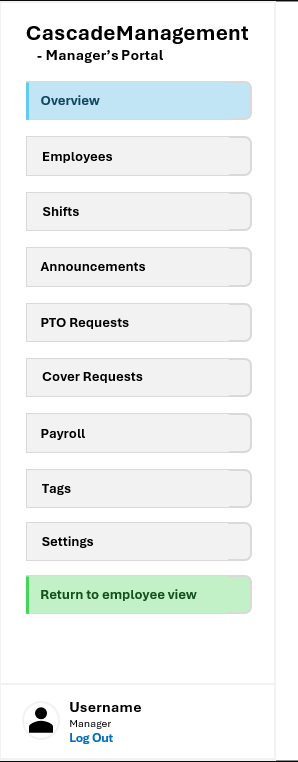
As a result, the management navigation mock-up was redesigned as a vertical sidebar shown below in Figure 10, maintaining the same colours as in previous navigation implementations while highly increasing usability of the component. Finally, to ensure usability on small screens, a collapsable hamburger menu was implemented for mobile devices, allowing users to click open the sidebar while maintaining all navigation options, as shown below in Figure 11.
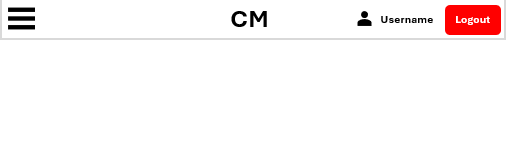
Figure 11 - Mobile view of the management area, showing the collapsible hamburger menu which opens the sidebar, maintaining the same navigation options on smaller screens.
These changes directly reflect stakeholder feedback, demonstrating iterative design improvements while maintaining consistent UI patterns and accessibility across devices.
Internal & External Data Storage
Server Side
Internal
Variables
| Name | Type | Explanation | Validation |
|---|---|---|---|
| JWT_EXP_DELTA_SECONDS | Integer | Token expiration time in seconds, set to 3600 (1 hour) | Ensures tokens expire after 1 hour for security |
| DB_URL | String | Database connection string pointing to SQLite or custom database | Defaults to "sqlite:///rota.db" to ensure database exists and is accessible |
| KEY_PATH | String | File path where Fernet encryption key is stored or generated | Validates file exists or creates it if missing for data encryption |
| max_overtime_minutes | Integer | Maximum minutes an employee can work past their shift end time | Prevents employees from working excessively long hours; default 30 minutes |
| lunch_threshold_hours | Float | Minimum hours worked in a shift before lunch break is automatically deducted | Ensures fair lunch deduction only on longer shifts; default 6 hours |
| lunch_deduction_hours | Float | Number of hours deducted from worked time to account for unpaid lunch break | Standardizes lunch break duration; default 0.5 hours |
| overtime_threshold_minutes | Integer | Minutes worked before overtime pay rate applies to the shift | Determines when employees transition to overtime compensation; default 60 minutes |
| clock_in_early_minutes | Integer | How many minutes before scheduled shift start an employee can clock in | Prevents premature clock-ins while allowing reasonable buffer; default 5 minutes |
| worked_duration | Object (timedelta) | Time difference calculated between clock_out_time and clock_in_time | For accurately calculating total hours worked in a shift |
| total_worked_hours | Float | Total hours worked in a shift, converted from timedelta to decimal hours | For payroll calculations and overtime determination |
| overtime_hours | Float | Hours worked beyond the overtime threshold, calculated as max(0, total_worked_hours - threshold) | For determining overtime pay and tracking excessive hours |
| payday_day | Integer | Day of the month (1-31) when payroll processing and automated payroll runs | Allows company to set custom payday; default 1st of month |
| priority | String | Announcement priority level ("low", "normal", or "high") for sorting and display | Controls visibility and ordering of announcements to employees |
| status | String | Current status of PTO or cover requests ("pending", "approved", "rejected", "accepted") | Tracks workflow state and determines what actions are allowed |
| cover_state | String | Shift cover status (null, "requested", "covered", or "cancelled") | Indicates whether shift needs coverage and if it has been covered |
| user | Object | Current authenticated user payload extracted from JWT token | Contains user_id, email, is_manager for authorization checks on every request |
| session | Object | Active database session for executing queries and transactions | Created from SessionLocal factory; must be closed after use to return connection |
| active_clocks | Array | List of all ClockEntry objects where employee is currently clocked in (clock_out_time is None) | For identifying which employees need auto clock-out when exceeding max overtime |
| recipients | Array (Strings) | List of email addresses to send announcements or payroll reports to | For bulk email sending to multiple employees |
| details | Object (Dictionary) | Key-value pairs containing additional context about an audit action | For storing JSON-serializable details like old/new values in audit trail |
| details_json | String | JSON-stringified version of details dictionary for database storage | For persisting audit log details in text column |
| html_content | String | Generated HTML markup for email template rendering | For creating formatted emails with styling and links |
| msg | Object (MIMEMultipart) | Email message object containing subject, recipients, and HTML/text parts | For composing complete email messages before SMTP transmission |
| smtp_username | String | Decrypted SMTP server username from settings | For authenticating to SMTP server when sending emails |
| smtp_password | String | Decrypted SMTP server password from settings | For authenticating to SMTP server when sending emails |
| temp_password | String | Generated temporary password (12 characters with letters, digits, special chars) | For new employees or admin password resets; sent via email |
| token | String | Password reset token or JWT authentication token | For validating password reset requests and authenticating users |
| hashed | String | Bcrypt-hashed password (60 characters) | For securely storing passwords in database without plaintext |
| payload | Object (Dictionary) | Decoded JWT token data containing user_id, email, is_manager, and expiration | For extracting user information from authentication token |
| now | Object (datetime) | Current date and time in UK timezone (GMT/BST) | For timestamp comparisons, shift timing validation, and payroll processing |
Functions
| Name | Type | Explanation | Validation |
|---|---|---|---|
| hash_password() | Function | Hashes plaintext password using bcrypt for secure storage in database | Validates input is non-empty string; returns 60-character bcrypt hash for storage |
| verify_password() | Function | Compares plaintext password against stored bcrypt hash during login | Validates password matches hash through bcrypt comparison; returns boolean |
| create_jwt() | Function | Creates signed JWT token containing user_id, email, is_manager flag with 1-hour expiration | Validates user_id is integer, email is string; returns JWT string for authentication |
| decode_jwt() | Function | Decodes and validates JWT token signature and expiration time | Validates token is valid and not expired; returns payload dict or None |
| get_current_user() | Function | Extracts user information from Authorization header Bearer token in request | Validates Authorization header format and token validity; returns user dict or None |
| require_auth() | Function (Decorator) | Ensures request has valid JWT token before proceeding to route handler | Validates authentication required; returns 401 Unauthorized if missing/invalid |
| require_manager() | Function (Decorator) | Ensures authenticated user has manager role before allowing access | Validates is_manager flag is true; returns 403 Forbidden if not manager |
| require_self_or_manager() | Function (Decorator) | Allows user to access own data or any data if they are a manager | Validates employee_id matches user_id or user is manager; returns 403 if denied |
| encrypt_field() | Function | Encrypts sensitive string data (pay rates, personal info) using Fernet symmetric cipher | Validates input is non-empty string; returns base64-encoded encrypted string |
| decrypt_field() | Function | Decrypts Fernet-encrypted field back to original plaintext string | Validates encrypted string is valid Fernet token; returns original plaintext |
| get_uk_now() | Function | Gets current date/time in UK timezone (Europe/London) with GMT/BST automatic handling | Validates timezone is correctly set; returns timezone-aware datetime object |
| to_uk_time() | Function | Converts any datetime object to UK timezone, handles both naive and aware datetimes | Validates datetime input; returns UK-timezone-aware datetime |
| uk_time_to_utc() | Function | Converts UK timezone datetime to UTC for consistent database storage | Validates input datetime; returns UTC-timezone datetime |
| utc_to_uk_time() | Function | Converts UTC datetime to UK timezone for display to users in correct local time | Validates input datetime; returns UK-timezone datetime |
| parse_datetime_uk() | Function | Parses ISO 8601 datetime strings and ensures they are interpreted as UK timezone | Validates datetime string format; returns UK-timezone datetime or raises error |
| generate_temp_password() | Function | Generates secure random 12-character temporary password with mixed character types | Validates password meets complexity with letters, digits, special chars; returns string |
| send_html_email() | Function | Sends HTML email via SMTP using settings retrieved from database configuration | Validates SMTP settings exist and are properly configured; returns boolean success |
| send_announcement_email() | Function | Sends announcement email to multiple employees with priority level and formatted content | Validates recipients list not empty; ensures SMTP configured before sending |
| log_audit_action() | Function | Logs management action (create/update/delete) to audit trail with user, action, resource details | Validates user_id exists; stores JSON-serializable details and timestamp |
| get_audit_logs() | Function | Retrieves audit log entries with optional filtering by user, action, resource type, date range | Validates filter parameters are valid types; returns list of audit log records |
| get_all_actions() | Function | Gets list of all unique audit action types that have been recorded in system | Returns distinct action strings from AuditActions constant class |
| get_all_resource_types() | Function | Gets list of all unique resource types that appear in audit logs | Returns distinct resource types from ResourceTypes constant class |
| calculate_hours_with_lunch_deduction() | Function | Calculates total hours worked minus lunch break deduction if shift exceeds lunch threshold | Validates start_time before end_time; returns float hours worked |
| is_payday() | Function | Checks if today's date matches the configured payday day of month | Validates payday_day setting; handles edge cases like Feb 31 → Feb 28/29 |
| get_previous_month_range() | Function | Calculates start and end dates of previous month for payroll period calculations | Returns tuple of (first_day_of_previous_month, last_day_of_previous_month) |
| auto_clock_out_task() | Async Function (Background) | Runs every 5 minutes to automatically clock out employees exceeding max overtime limit | Validates clock entries exist; marks overtime_minutes and auto_clocked_out flag |
| payroll_automation_task() | Async Function (Background) | Runs daily at 9 AM to check if payday and trigger automated payroll report generation | Validates payday_day matches current date; generates and sends payroll |
| process_automated_payroll() | Async Function | Generates payroll data for previous month and sends reports to employees and admin | Validates is payday; generates payroll with hours, overtime, deductions |
| generate_payroll_data() | Async Function | Calculates all payroll information (hours, overtime, pay) for all employees in date range | Validates date range is correct; returns dict with per-employee payroll data |
| login() | Async Function | Authenticates user with email/password and returns JWT token for session management | Validates email exists and password is correct; returns JWT or 401 error |
| get_employees() | Async Function | Retrieves all employees with full details including encrypted pay rates and personal info | Requires manager role; decrypts sensitive fields; returns complete employee records |
| get_employees_basic() | Async Function | Retrieves basic employee list with only id, first_name, last_name, email for UI dropdowns | Requires authentication; returns lightweight employee list for efficient loading |
| create_employee() | Async Function | Creates new employee account with encrypted pay rate, validates unique email, sends welcome | Requires manager role; validates email not already used; encrypts sensitive data |
| update_employee() | Async Function | Updates existing employee data including name, email, pay rate, role, and status | Requires manager role; encrypts pay_rate field; logs changes to audit trail |
| delete_employee() | Async Function | Deletes employee account and cascades deletion to shifts, clock entries, PTO requests | Requires manager role; removes all related records; logs to audit trail |
| suspend_employee() | Async Function | Toggles employee suspended status to prevent login and clock-in capabilities | Requires manager role; sets suspended boolean flag on employee |
| reset_employee_password() | Async Function | Admin password reset that generates temp password and sends via email to employee | Requires manager role; generates secure temp password; sends notification |
| get_own_profile() | Async Function | Gets authenticated user's own profile with all personal data decrypted | Requires self access; returns user's complete employee data with decrypted fields |
| update_own_profile() | Async Function | Allows user to update their own name, email, phone, emergency contact, profile picture | Requires self access; encrypts sensitive fields; validates email uniqueness |
| request_password_reset() | Async Function | Public endpoint to initiate password reset by email, creates time-limited reset token | Validates email exists; generates 30-minute expiration token; sends reset link |
| verify_reset_token() | Async Function | Validates password reset token exists, not expired, and not already used | Checks token validity; returns employee details or error status |
| confirm_password_reset() | Async Function | Completes password reset by validating token and updating password hash | Validates token; marks token as used; updates password_hash in database |
| get_shifts() | Async Function | Retrieves shifts with optional filters for date range, employee, tag, and status | Manager sees all shifts, employee sees own; returns shift details with times |
| create_shift() | Async Function | Creates single or recurring shifts (weekly/biweekly/monthly) with pay rate snapshot | Requires manager role; validates date/time valid; stores current pay rate |
| update_shift() | Async Function | Updates shift details including time, employee, recurring pattern, and tag | Requires manager role; prevents editing shifts in the past; logs changes |
| delete_shift() | Async Function | Deletes shift and cascades deletion to related clock entries and cover requests | Requires manager role; removes all dependent records; logs deletion |
| request_cover() | Async Function | Creates cover request for shift, can target specific employee or broadcast to all | Shift owner only; updates shift cover_state to "requested" status |
| cancel_shift() | Async Function | Cancels shift with optional reason, updates cover_state to "cancelled" | Requires shift ownership or manager role; records cancellation reason |
| get_upcoming_clockable_shifts() | Async Function | Gets shifts employee can clock into within early clock-in window (default 5 min before start) | Returns future shifts within timing window; sorted by start time |
| get_current_clock_status() | Async Function | Checks if employee is currently clocked in and returns active clock entry details | Returns active clock entry or None if not clocked in |
| clock_in() | Async Function | Clocks employee into shift, validates shift exists and timing is correct, stores pay rate | Validates no duplicate clock-in exists; stores clock_in_time and pay_rate snapshot |
| clock_out() | Async Function | Clocks employee out, calculates hours worked, applies lunch deduction, calculates overtime | Validates employee is clocked in; calculates overtime; stores worked duration |
| get_pto_requests() | Async Function | Retrieves PTO requests filtered by role (employee sees own, manager sees all) | Returns pending/approved/rejected PTO requests with full details |
| create_pto_request() | Async Function | Creates PTO request for date range, calculates affected shift hours, requests approval | Validates date range; calculates hours from shifts in range; sets pending status |
| calculate_pto_impact() | Async Function | Calculates total shift hours that would be affected by PTO for given date range | Takes start_date and end_date; returns total hours of affected shifts |
| approve_pto() | Async Function | Approves PTO request, deducts paid hours from employee if applicable, cancels shifts | Requires manager role; updates status to approved; deducts pto_hours |
| reject_pto() | Async Function | Rejects PTO request and notifies employee of rejection | Requires manager role; updates status to rejected; sends notification |
| get_cover_requests() | Async Function | Retrieves cover requests for user (incoming they can accept, outgoing they made) | Returns cover requests with associated shift and employee information |
| get_available_cover_requests() | Async Function | Gets open cover requests that employee can accept (not yet covered, not own shifts) | Returns unaccepted cover requests excluding user's own shifts |
| create_cover_request() | Async Function | Creates cover request for specific employee or broadcasts to all employees | Validates shift ownership; updates shift cover_state to "requested" |
| accept_cover() | Async Function | Accepts cover request, reassigns shift to accepting employee, updates all statuses | Updates cover_request to accepted; reassigns shift; sends notifications |
| reject_cover() | Async Function | Rejects cover request, keeps shift in requested state for others to accept | Updates cover_request status to rejected |
| generate_payroll() | Async Function | Generates payroll report for date range, calculates all hours and overtime for employees | Requires manager role; calculates total hours, overtime, deductions per employee |
| send_payroll_emails() | Async Function | Sends payroll reports to all employees and admin summary to payroll email address | Requires manager role; uses HTML templates; sends individual and summary |
| get_settings() | Async Function | Retrieves system-wide settings including lunch, overtime, payday, and SMTP configuration | Requires manager role; decrypts SMTP credentials for display |
| update_settings() | Async Function | Updates system settings and encrypts sensitive fields like SMTP credentials | Requires manager role; validates numeric fields; encrypts passwords |
| test_email_settings() | Async Function | Sends test email to verify SMTP configuration is working correctly | Requires manager role; validates settings; confirms email delivery |
| get_announcements() | Async Function | Retrieves all announcements sorted by priority and creation date descending | Requires authentication; returns announcements with creator information |
| create_announcement() | Async Function | Creates announcement and optionally sends email to all employees with priority | Requires manager role; stores title, message, priority; sends HTML email |
| update_announcement() | Async Function | Updates announcement title, message, or priority level | Requires manager role; validates announcement exists; logs changes |
| delete_announcement() | Async Function | Deletes announcement from system | Requires manager role; removes record from database |
| get_tags() | Async Function | Retrieves all shift tags available for categorization | Requires authentication; returns tag id, name, and hex color |
| create_tag() | Async Function | Creates new shift tag with name and color for categorizing shifts | Requires manager role; validates unique tag name; stores hex color code |
| update_tag() | Async Function | Updates tag name or color | Requires manager role; validates unique name; updates color |
| delete_tag() | Async Function | Deletes tag and removes from all associated shifts | Requires manager role; cascades to remove tag from shifts |
Classes
Class: AuditActions
-
Static class containing audit action type constants for consistent logging throughout system
-
Attributes: • EMPLOYEE_CREATED: Records when new employee account is created by manager • EMPLOYEE_UPDATED: Records when employee data is modified • EMPLOYEE_DELETED: Records when employee account is permanently removed • EMPLOYEE_SUSPENDED: Records when employee account is suspended from use • EMPLOYEE_ACTIVATED: Records when suspended employee is reactivated • PASSWORD_RESET: Records when employee password is reset • SHIFT_CREATED: Records when individual shift is created • SHIFT_UPDATED: Records when shift details are modified • SHIFT_DELETED: Records when shift is permanently removed • SHIFT_BULK_CREATED: Records when multiple shifts created in batch operation • TAG_CREATED: Records when new shift tag is created • TAG_UPDATED: Records when tag name or colour is modified • TAG_DELETED: Records when tag is permanently removed • ANNOUNCEMENT_CREATED: Records when new announcement is posted • ANNOUNCEMENT_UPDATED: Records when announcement is edited • ANNOUNCEMENT_DELETED: Records when announcement is removed • SETTINGS_UPDATED: Records when system-wide settings are changed • CUSTOMIZATION_UPDATED: Records when branding customization is changed • EMAIL_TEST_SENT: Records when SMTP settings are tested with test email • PTO_APPROVED: Records when PTO request is approved by manager • PTO_REJECTED: Records when PTO request is rejected by manager • COVER_REQUEST_APPROVED: Records when cover request is accepted by employee • COVER_REQUEST_REJECTED: Records when cover request is declined by employee
-
Methods: • None (static constants for audit logging) Class: ResourceTypes
-
Static class containing resource type constants for categorizing and filtering audit records
-
Attributes: • EMPLOYEE: Identifies employee account records in audit logs • SHIFT: Identifies shift schedule records in audit logs • TAG: Identifies shift tag records in audit logs • ANNOUNCEMENT: Identifies announcement records in audit logs • SETTINGS: Identifies system settings records in audit logs • CUSTOMIZATION: Identifies branding customization records in audit logs • PTO_REQUEST: Identifies PTO request records in audit logs • COVER_REQUEST: Identifies shift cover request records in audit logs
-
Methods: • None (static constants for resource classification)
External
SQL Database
Database name: rota.db
Database type: SQLite (or custom via DATABASE_URL environment variable)
Primary key convention: id (auto-incremented integer for all tables)
Encryption: Sensitive fields are encrypted with Fernet cipher before storage
Table: employees
| Field Name | Data Type | Description | Validation |
|---|---|---|---|
| id | Integer (PK) | Unique identifier for each employee account | Auto-incremented; ensures uniqueness; must be positive integer |
| first_name | String | Employee's first name | Non-empty string; max length enforced by database |
| last_name | String | Employee's last name | Non-empty string; max length enforced by database |
| String (UNIQUE) | Employee's email address for login and contact | Must be unique across system; validated for email format before insertion; used as login credential | |
| password_hash | String | Bcrypt-hashed password (60 characters) | Never stored as plaintext; validated on login through bcrypt comparison; must be 60-character bcrypt hash |
| is_manager | Boolean | Whether employee has manager/admin privileges | Default false; determines access to manager-only endpoints and data |
| pay_rate_encrypted | String | Encrypted hourly or salary pay rate | Encrypted with Fernet cipher; decrypted only when needed for payroll calculations; never exposed to frontend |
| pto_hours | Float | Available paid time off hours remaining | Default 0; must be non-negative; decremented when PTO approved; updated during payroll cycles |
| suspended | Boolean | Whether employee account is suspended from login/work | Default false; when true, prevents login and clock-in; allows account deactivation without deletion |
| notes_encrypted | String | Encrypted manager notes or additional employee information | Optional field; encrypted for privacy; stored as Fernet encrypted string |
| files_encrypted | String | Encrypted reference or data for employee files | Optional field; encrypted for security; could contain file paths or encoded data |
| phone_encrypted | String | Encrypted phone number for contact purposes | Optional field; encrypted for privacy; should be valid phone format before encryption |
| address_encrypted | String | Encrypted residential or business address | Optional field; encrypted for privacy and security |
| emergency_contact_encrypted | String | Encrypted emergency contact information | Optional field; encrypted for security; typically name and phone |
| profile_picture | String | Base64-encoded image data or file path to profile picture | Optional field; stored as string; may be base64 data or reference to file location |
Table Name: employees Primary Key: id Indexes: Index on email (unique) for fast login lookups; index on is_manager for filtering employees by role
Validation Considerations: • Email must be unique and valid format • Password is validated through bcrypt verification • Encrypted fields are decrypted server-side only through decrypt_field() function • Suspended employees cannot perform any actions requiring authentication • All string inputs sanitized to prevent SQL injection
Table: shifts
| Field Name | Data Type | Description | Validation |
|---|---|---|---|
| id | Integer (PK) | Unique identifier for each shift | Auto-incremented; ensures uniqueness; must be positive integer |
| employee_id | Integer (FK) | Reference to employee assigned to shift | Foreign key to employees.id; must reference valid employee; prevents orphaned shifts |
| start_time | DateTime | Shift start date and time in UK timezone | Non-null; must be before end_time; validated for timezone consistency |
| end_time | DateTime | Shift end date and time in UK timezone | Non-null; must be after start_time; validates shift duration is reasonable (typically 1-16 hours) |
| is_recurring | Boolean | Whether shift repeats on a pattern | Default false; if true, must have valid recurring_pattern; used to generate multiple shifts |
| recurring_pattern | String | Pattern for recurring shifts | Must be "weekly", "biweekly", or "monthly" if is_recurring is true; nullable if not recurring |
| cover_state | String | Current cover status of shift | Must be null, "requested", "covered", or "cancelled"; null means no cover needed or covered; "requested" means looking for coverage |
| cancelled_reason | String | Reason why shift was cancelled | Optional; only populated when cover_state is "cancelled"; stores manager's cancellation reason |
| pay_rate_encrypted | String | Pay rate at time of shift creation (snapshot) | Encrypted with Fernet cipher; stored separately from employee pay_rate to preserve historical pay data |
| tag_id | Integer (FK) | Reference to optional tag for shift categorization | Foreign key to tags.id; optional (nullable); allows categorizing shifts by type/team |
Table Name: shifts Primary Key: id Indexes: Index on employee_id for retrieving employee's shifts; index on start_time for chronological queries; index on cover_state for filtering coverage requests
Validation Considerations: • start_time must be before end_time • pay_rate_encrypted must be valid Fernet-encrypted string • Cascading delete: when employee deleted, all shifts must be handled (typically deleted or reassigned) • Cover_state transitions: null → "requested" → "covered" or "cancelled"
Table: clock_entries
| Field Name | Data Type | Description | Validation |
|---|---|---|---|
| id | Integer (PK) | Unique identifier for each clock entry | Auto-incremented; ensures uniqueness; must be positive integer |
| employee_id | Integer (FK) | Reference to employee who clocked in | Foreign key to employees.id; must reference valid employee |
| shift_id | Integer (FK) | Reference to shift being worked | Foreign key to shifts.id; must reference valid shift; prevents clocking into non-existent shift |
| clock_in_time | DateTime | Date and time when employee clocked in | Non-null; must be within shift start_time window (clock_in_early_minutes before to shift start); validated in UK timezone |
| clock_out_time | DateTime | Date and time when employee clocked out | Nullable (null means still clocked in); must be after clock_in_time; required for calculating worked hours |
| pay_rate_encrypted | String | Pay rate snapshot at time of clock in | Encrypted with Fernet cipher; captures rate in effect when worked; used for accurate payroll |
| lunch_deducted | Boolean | Whether lunch break deduction was applied | Default false; set to true if shift exceeded lunch_threshold_hours; prevents duplicate deductions |
| overtime_minutes | Integer | Minutes of overtime worked beyond threshold | Default 0; calculated as (worked_minutes - overtime_threshold_minutes); must be non-negative |
| auto_clocked_out | Boolean | Whether system auto-clocked out due to max overtime | Default false; set true when auto_clock_out_task() exceeds max_overtime_minutes; tracks non-manual clock-outs |
| created_at | DateTime | Timestamp when clock entry was created | Non-null; automatically set on creation; used for audit trail and troubleshooting |
Table Name: clock_entries Primary Key: id Indexes: Index on employee_id for retrieving employee's time tracking; index on shift_id for shift-specific records; index on clock_in_time for date range queries
Validation Considerations: • clock_in_time must be within shift timing window • clock_out_time must be after clock_in_time (if not null) • Only one active (non-clocked-out) entry per employee at a time (enforced application-side) • Cascading delete: when shift deleted, associated clock entries should be deleted • auto_clocked_out flag distinguishes manual vs automatic clock-outs
Table: pto_requests
| Field Name | Data Type | Description | Validation |
|---|---|---|---|
| id | Integer (PK) | Unique identifier for each PTO request | Auto-incremented; ensures uniqueness; must be positive integer |
| employee_id | Integer (FK) | Reference to employee requesting time off | Foreign key to employees.id; must reference valid employee |
| start_date | DateTime | First day of PTO period | Non-null; must be before end_date; validated for future dates (typically cannot request past PTO) |
| end_date | DateTime | Last day of PTO period | Non-null; must be after start_date; inclusive date range |
| hours_requested | Float | Total hours of PTO being requested | Must be positive; typically calculated from shifts affected by date range; must not exceed available pto_hours |
| use_paid_pto | Boolean | Whether to use paid PTO hours or unpaid leave | Default false; affects pto_hours deduction when approved; true means deduct from employee pto_hours |
| status | String | Current approval status | Default "pending"; must be "pending", "approved", or "rejected"; workflow state for approval process |
| approver_id | Integer (FK) | Reference to manager who approved/rejected | Foreign key to employees.id; optional until approved/rejected; tracks which manager made decision |
Table Name: pto_requests Primary Key: id Indexes: Index on employee_id for retrieving employee's PTO requests; index on status for filtering pending/approved requests; index on start_date for date range queries
Validation Considerations: • start_date must be before or equal to end_date • hours_requested must be positive and <= available pto_hours • status can only transition: pending → approved OR pending → rejected (not reversible) • approver_id required when status is "approved" or "rejected" • Cascading delete: when employee deleted, PTO requests should be handled appropriately
Table: cover_requests
| Field Name | Data Type | Description | Validation |
|---|---|---|---|
| id | Integer (PK) | Unique identifier for each cover request | Auto-incremented; ensures uniqueness; must be positive integer |
| shift_id | Integer (FK) | Reference to shift needing coverage | Foreign key to shifts.id; must reference valid shift; required to determine shift details |
| requester_id | Integer (FK) | Reference to employee requesting coverage | Foreign key to employees.id; must be the employee assigned to the shift; owner of shift |
| requested_employee_id | Integer (FK) | Reference to specific employee requested to cover | Foreign key to employees.id; optional (nullable) if broadcast to all; if populated, targets specific employee |
| status | String | Current status of cover request | Default "pending"; must be "pending", "accepted", or "rejected"; tracks whether coverage been found |
Table Name: cover_requests Primary Key: id Indexes: Index on shift_id for retrieving cover requests for shift; index on requester_id for employee's outgoing requests; index on requested_employee_id for incoming requests; index on status for filtering pending/accepted
Validation Considerations: • requester_id must match the shift's employee_id (validate shift ownership) • requested_employee_id can be null (broadcast) or valid employee_id (targeted) • status transitions: pending → accepted OR pending → rejected • When accepted, shift.employee_id should be updated to requested_employee_id (or accepter in broadcast case) • Cascading delete: when shift deleted, cover requests should be deleted
Table: tags
| Field Name | Data Type | Description | Validation |
|---|---|---|---|
| id | Integer (PK) | Unique identifier for each tag | Auto-incremented; ensures uniqueness; must be positive integer |
| name | String (UNIQUE) | Tag name for categorizing shifts | Must be unique across system; non-empty; validates no duplicate tags; used for filtering shifts by category |
| color | String | Hex color code for UI display (#RRGGBB) | Default "#3B82F6" (blue); must be valid 7-character hex code starting with #; validates format before insertion |
| created_at | DateTime | Timestamp when tag was created | Non-null; automatically set on creation; used for audit purposes |
Table Name: tags Primary Key: id Indexes: Index on name (unique) for fast tag lookup; index on created_at for chronological queries
Validation Considerations: • name must be unique (prevents duplicate tags) • color must be valid hex format (#RRGGBB) • Cascading delete: when tag deleted, tag_id should be set to null in associated shifts (preserve shift data) • Tag names should be descriptive for manager organization
Table: audit_logs
| Field Name | Data Type | Description | Validation |
|---|---|---|---|
| id | Integer (PK) | Unique identifier for each audit log entry | Auto-incremented; ensures uniqueness; must be positive integer |
| user_id | Integer (FK) | Reference to employee who performed the action | Foreign key to employees.id; must reference valid employee/manager |
| action | String | Type of action performed (from AuditActions) | Must be valid action constant (e.g., "employee_created", "shift_updated"); validates against known action types |
| resource_type | String | Type of resource affected (from ResourceTypes) | Must be valid resource type (e.g., "employee", "shift", "tag"); validates against known resource types |
| resource_id | Integer | ID of specific resource affected | Optional; identifies which record was affected; null if action affects multiple resources |
| details | Text | JSON string with additional action details | Optional; stores JSON with old_value, new_value, reason, etc.; allows detailed change tracking |
| timestamp | DateTime | When the action was performed | Non-null; automatically set on creation; used for audit trail chronology and compliance |
Table Name: audit_logs Primary Key: id Indexes: Index on user_id for retrieving employee's actions; index on action for filtering by action type; index on resource_type for filtering by resource; index on timestamp for date range queries
Validation Considerations: • action must be valid AuditActions constant • resource_type must be valid ResourceTypes constant • details should be valid JSON if populated • timestamp cannot be manually set (auto-generated) • Immutable: audit logs should never be updated or deleted (append-only)
Table: announcements
| Field Name | Data Type | Description | Validation |
|---|---|---|---|
| id | Integer (PK) | Unique identifier for each announcement | Auto-incremented; ensures uniqueness; must be positive integer |
| title | String | Announcement title displayed to employees | Non-empty string; max length enforced; should be concise and descriptive |
| message | String | Full announcement message content | Non-empty string; can contain detailed information; sent via email if enabled |
| priority | String | Priority level for display ordering | Default "normal"; must be "low", "normal", or "high"; determines prominence in UI |
| created_at | DateTime | Timestamp when announcement was created | Non-null; automatically set on creation; used for sorting announcements |
| created_by | Integer (FK) | Reference to manager who created announcement | Foreign key to employees.id; tracks who posted announcement; typically is_manager must be true |
Table Name: announcements Primary Key: id Indexes: Index on priority for filtering by urgency; index on created_at for chronological sorting; index on created_by for tracking manager announcements
Validation Considerations: • title and message must be non-empty • priority must be "low", "normal", or "high" • created_by must reference valid manager (validate is_manager = true) • Cascading considerations: when employee deleted, their announcements may be reassigned or preserved
Table: password_reset_tokens
| Field Name | Data Type | Description | Validation |
|---|---|---|---|
| id | Integer (PK) | Unique identifier for each reset token | Auto-incremented; ensures uniqueness; must be positive integer |
| token | String (UNIQUE) | Unique token for password reset link | Must be unique; typically UUID or cryptographic token; sent in password reset email |
| employee_id | Integer (FK) | Reference to employee requesting reset | Foreign key to employees.id; must reference valid employee |
| expires_at | DateTime | Expiration timestamp (30 minutes from creation) | Non-null; set to current time + 30 minutes on creation; tokens expire for security |
| used | Boolean | Whether token has already been used | Default false; set to true after password reset confirmed; prevents token reuse |
| created_at | DateTime | Timestamp when token was created | Non-null; automatically set on creation; used for cleanup of expired tokens |
Table Name: password_reset_tokens Primary Key: id Indexes: Index on token (unique) for fast lookup; index on employee_id for retrieving employee's tokens; index on expires_at for cleanup of expired tokens
Validation Considerations: • token must be unique and cryptographically secure • expires_at must be 30 minutes from creation • token can only be used once (used flag prevents reuse) • Expired tokens should be cleaned up periodically (not enforced database-side but application-side) • Cascading delete: when employee deleted, related reset tokens should be deleted
Table: settings
| Field Name | Data Type | Description | Validation |
|---|---|---|---|
| id | Integer (PK) | Unique identifier (typically only one settings record) | Auto-incremented; typically only id=1 used; ensures data structure |
| lunch_threshold_hours | Float | Minimum hours worked before lunch deduction applies | Default 6; must be positive; validates shift duration for lunch eligibility |
| lunch_deduction_amount | Float | Hours deducted for lunch break | Default 0.5; must be positive; represents unpaid break duration |
| payday_day | Integer | Day of month (1-31) when payroll is processed | Default 1; must be 1-31; edge cases handled for months with fewer days |
| payroll_email_encrypted | String | Encrypted email address for payroll report distribution | Encrypted with Fernet cipher; decrypted for sending payroll emails |
| working_day_length | Float | Standard working hours per day | Default 8; used for calculating full-time vs part-time status |
| clock_in_early_minutes | Integer | How many minutes before shift start employees can clock in | Default 5; must be non-negative; validates early clock-in window |
| max_overtime_minutes | Integer | Maximum minutes past shift end before auto clock-out | Default 30; must be positive; prevents excessive overtime without manager intervention |
| overtime_threshold_minutes | Integer | Minutes before overtime pay rate kicks in | Default 60; must be positive; determines when premium pay starts |
| smtp_host | String | SMTP server hostname for sending emails | Default "localhost"; must be valid hostname or IP for email delivery |
| smtp_port | Integer | SMTP server port number | Default 587; typical values are 25, 465, 587; must be valid port (1-65535) |
| smtp_username_encrypted | String | Encrypted SMTP authentication username | Encrypted with Fernet cipher; decrypted only for SMTP authentication |
| smtp_password_encrypted | String | Encrypted SMTP authentication password | Encrypted with Fernet cipher; decrypted only for SMTP authentication |
| smtp_use_tls | Boolean | Whether to use TLS for SMTP connection | Default true; enables encryption for email transmission |
| smtp_from_email | String | "From" email address for outgoing emails | Must be valid email format; appears in employee notification emails |
Table Name: settings Primary Key: id Indexes: No special indexes needed (single record table)
Validation Considerations: • All time/minute values must be positive or zero • payday_day must be 1-31 (edge case: Feb 31 → Feb 28/29) • All encrypted fields must be valid Fernet-encrypted strings • SMTP settings validated before sending emails (test_email_settings endpoint) • Settings should be validated application-side before updates • Typically only one settings record (id=1) in database
Client Side
Internal
Variables
| Name | Type | Explanation | Validation |
|---|---|---|---|
| user | Object (null or user object) | Currently authenticated user containing credentials | Contains token, user_id, email, is_manager; null if not logged in |
| shifts | Array | List of all shifts (employee or manager view) | Fetched from /api/shifts; used for calendar and scheduling |
| employees | Array | List of all employees (manager only) | Fetched from /api/employees; contains all employee data |
| ptos | Array | List of all PTO requests | Fetched from /api/pto; manager sees all, employee sees own |
| covers | Array | List of cover requests (incoming/outgoing) | Fetched from /api/cover; contains shift and request details |
| userProfile | Object | Current employee's complete profile data | Fetched from /api/profile; contains personal info and pto_hours |
| stats | Object | Weekly and monthly hours/earnings statistics | Contains hours_this_week, hours_this_month, earnings_this_week, earnings_this_month |
| clockableShifts | Array | Shifts available for clocking in (within time window) | Fetched from /api/clock/upcoming; shifts within clock-in early minutes |
| currentClock | Object (null or active clock) | Currently active clock entry if clocked in | Contains clock_in_time, shift_end, max_clock_out_time, clocked_in boolean; null if not clocked in |
| liveTimeWorked | Number (seconds) | Live counter of seconds worked since clock in | Updated every second; calculated from (now - clock_in_time) |
| liveRemainingTime | Number (seconds) | Live counter of seconds until shift end | Counts down to shift end time; updated every second |
| liveOvertimeRemaining | Number (seconds) or null | Live counter of overtime seconds remaining | Only during overtime period; null before shift ends |
| ptoImpact | Object (null or impact data) | Calculated PTO hours impact for date range | Contains total_hours of shifts affected; auto-calculated from ptoForm dates |
| announcements | Array | List of all announcements | Fetched from /api/announcements; sorted by priority and date |
| tags | Array | List of all shift tags (manager only) | Fetched from /api/tags; contains id, name, color for categorization |
| payrollData | Object (null or payroll data) | Generated payroll report data | Contains per-employee hours, overtime, earnings; null until generated |
| loading | Boolean | Whether data is currently loading | Prevents re-fetching; shows loading state UI |
| error | String | Error message to display to user | Cleared after timeout; set when API calls fail |
| success | String | Success message to display to user | Cleared after timeout; set on successful operations |
| showPTOForm | Boolean | Whether PTO request form modal is visible | Employee dashboard; toggle button controls visibility |
| showCoverModal | Boolean | Whether shift cover request modal is visible | Employee dashboard; toggle button controls visibility |
| showLogoutModal | Boolean | Whether logout confirmation modal is visible | All pages; toggle button controls visibility |
| showCreateModal | Boolean | Whether create employee modal is visible | EmployeeManagement; toggle button controls visibility |
| showCreateForm | Boolean | Whether create shift form is visible | ShiftManagement; toggle button controls visibility |
| showEditModal | Boolean | Whether edit shift modal is visible | ShiftManagement; toggle button controls visibility |
| deleteModal | Object | Delete confirmation modal state | Contains isOpen boolean and employee/shift object |
| selectedShift | Object (null or shift) | Shift selected for cover request | Employee dashboard; populated when user initiates cover request |
| selectedUser | Object (null or employee) | Employee selected for detailed view/edit | EmployeeManagement; populated when clicking on employee |
| coverRequest | Object | Form data for cover request being created | Contains requested_employee_id; null means broadcast to all |
| ptoForm | Object | Form data for new PTO request | Contains start_date, end_date, hours_requested, use_paid_pto |
| shiftForm | Object | Form data for creating/editing shift | Contains employee_id, start_time, end_time, tag_id, recurring_pattern, is_bulk |
| newEmployee | Object | Form data for creating new employee | Contains first_name, last_name, email, pay_rate, is_manager, send_temp_password |
| editingShiftData | Object | Current shift being edited | Contains id, employee_id, start_time, end_time, tag_id |
| profile | Object | Current employee's profile being edited | Contains all profile fields for editing |
| dateRange | Object | Date range for payroll generation | Contains start_date, end_date in ISO format |
| currentWeek | Date | The week being displayed in calendar view | Updated when navigating weeks; used for filtering shifts |
| currentPage | Number | Current page in pagination | Used for employee/shift list pagination |
| itemsPerPage | Number | Items per page in pagination | Default 10; used for paginating long lists |
| filterRole | String | Filter for employee role ("all", "manager", "employee") | Used in EmployeeManagement to filter list |
| filterTag | String | Filter for shift tags | Used in ShiftManagement to filter shifts by category |
| searchTerm | String | Search query for filtering lists | Used to search employee names, emails, etc. |
| viewMode | String | Current calendar view mode | "week" or "month" determines which shifts displayed |
| mobileMenuOpen | Boolean | Whether mobile menu is expanded | Used on mobile devices only |
| settingsDropdownOpen | Boolean | Whether settings dropdown is open | ManagementDashboard; toggle state |
| clockLoading | Boolean | Whether clock data is being fetched | Prevents double requests during loading |
| testEmail | String | Email address for testing SMTP configuration | Settings component; user-entered email |
| testingEmail | Boolean | Whether SMTP test is in progress | Settings component; prevents multiple simultaneous tests |
| debouncedSaveRef | Ref | Reference to debounced save function | Profile page; auto-saves profile changes with 700ms debounce |
Functions
| Name | Type | Explanation | Validation |
|---|---|---|---|
| loadDashboardData() | Function | Fetches all dashboard data in parallel from backend | Makes 6 parallel requests; sets all state variables; handles errors |
| loadClockData() | Function | Fetches upcoming clockable shifts and current clock status | Checks for auto-clock-out; updates clock state; handles auto-clock-out message |
| clockIn() | Function | Clocks employee into shift via /api/clock/in/<shift_id> | Validates shift_id; updates currentClock state; starts live timer |
| clockOut() | Function | Clocks employee out via /api/clock/out | Sends POST request; stops timer; refreshes clock data; calculates hours worked |
| handleAutoClockOut() | Function | Handles automatic clock-out when overtime expires | Triggered by live timer; clocks out and refreshes data |
| createPTORequest() | Function | Creates PTO request via /api/pto POST | Validates form; sends to backend; refreshes PTO list |
| approvePTOAction() | Function | Approves or rejects PTO request | Manager only; updates PTO status; refreshes list |
| createCoverRequest() | Function | Creates cover request via /api/cover POST | Validates shift selection; sends to backend; clears form |
| acceptCoverRequest() | Function | Accepts cover request via /api/cover/<id>/accept POST | Reassigns shift; sends notification; refreshes data |
| rejectCoverRequest() | Function | Rejects cover request via /api/cover/<id>/reject POST | Updates status; refreshes cover list |
| loadEmployees() | Function (EmployeeManagement) | Fetches all employees from /api/employees | Manager only; updates employees state |
| handleCreateEmployee() | Function (EmployeeManagement) | Creates new employee via /api/employees POST | Validates form data; sends to backend; refreshes employee list |
| handleDeleteEmployee() | Function (EmployeeManagement) | Deletes employee via /api/employees/<id> DELETE | Manager only; shows confirmation; refreshes list |
| handleSuspendEmployee() | Function (EmployeeManagement) | Suspends/activates employee account | Manager only; toggles suspended status |
| navigateToEmployee() | Function (EmployeeManagement) | Navigates to employee detail view | Opens EmployeeDetail component |
| loadShifts() | Function (ShiftManagement) | Fetches all shifts from /api/shifts | Manager only; updates shifts state; filters by tag |
| handleCreateShift() | Function (ShiftManagement) | Creates new shift via /api/shifts POST | Validates dates and times; handles recurring shifts; refreshes list |
| handleEditShift() | Function (ShiftManagement) | Updates shift via /api/shifts/<id> PUT | Manager only; prevents editing past shifts; refreshes list |
| handleDeleteShift() | Function (ShiftManagement) | Deletes shift via /api/shifts/<id> DELETE | Manager only; shows confirmation; cascades to clock entries |
| handleRequestCover() | Function (ShiftManagement) | Creates cover request for shift | Validates shift; updates cover_state; refreshes data |
| generatePayroll() | Function (PayrollManagement) | Generates payroll report via /api/payroll/generate POST | Manager only; calculates hours, overtime, pay for date range; populates payrollData state |
| sendPayrollEmails() | Function (PayrollManagement) | Sends payroll reports via /api/payroll/send POST | Manager only; sends individual + admin summary emails; shows success message |
| loadAnnouncements() | Function (Announcements) | Fetches announcements via /api/announcements GET | Authenticated users; updates announcements state; sorted by priority |
| handleAutoSaveField() | Function (Profile) | Auto-saves profile field changes | Debounced 700ms; sends PUT request to /api/profile; excludes password fields |
| handleChangePassword() | Function (Profile) | Changes user's password | Validates current password; sends PUT request; clears password fields |
| handleProfilePictureChange() | Function (Profile) | Handles profile picture upload | Validates file size (max 2MB) and type; converts to base64 |
| loadProfile() | Function (Profile) | Fetches current user's profile from /api/profile | Decrypts sensitive fields; updates profile state |
| handleLogout() | Function | Initiates logout process | Shows confirmation modal; calls logout on confirm; clears all state |
| calculatePtoImpact() | Function | Calculates PTO impact via /api/pto/calculate POST | Debounced API call; updates ptoImpact state; auto-fills hours_requested |
| formatUKTime() | Function | Formats datetime to UK timezone string | Converts to "DD/MM/YYYY HH:MM:SS" format |
| formatUKTimeOnly() | Function | Formats time portion only | Returns "HH:MM:SS" format |
| formatUKDateOnly() | Function | Formats date portion only | Returns "DD/MM/YYYY" format |
| getUKNow() | Function | Gets current time in UK timezone | Returns timezone-aware datetime; used for all time comparisons |
| formatDuration() | Function | Formats seconds as human-readable duration | Converts to "Xh Ym Zs" format for display |
| getWeekStart() | Function | Calculates start of week (Sunday) for calendar | Used in calendar view calculations |
| getMonthStart() | Function | Calculates start of month for calendar | Used in month view calculations |
| getCalendarWeeks() | Function | Gets array of weeks for month view | Returns weeks array with days for calendar rendering |
| getShiftStyles() | Function | Gets CSS classes for shift styling based on tag | Returns Tailwind classes or inline styles |
| getShiftBackgroundStyle() | Function | Gets inline style object for shift background color | Converts hex tag color to light shade for background |
| getPriorityColor() | Function (Announcements) | Gets border color class based on announcement priority | Returns Tailwind color class |
| getPriorityBadge() | Function (Announcements) | Gets badge styling based on announcement priority | Returns Tailwind badge classes |
| getPriorityLabel() | Function (Announcements) | Gets display label for announcement priority | Returns human-readable priority string |
| formatCurrency() | Function (PayrollManagement) | Formats amount as GBP currency string | Uses Intl.NumberFormat for locale-aware formatting |
| formatDate() | Function | Formats date string to localized format | Returns "DD Month YYYY" format |
| formatClock() | Function | Formats clock entry data for display | Calculates and formats hours worked |
Classes
Class: AuthContext
-
Context for managing global authentication state
-
Methods: • useAuth(): React hook to access authentication; returns user, login, logout, loading • login(userData): Sets user state with token, user_id, email, is_manager • logout(): Clears user state and authentication • AuthProvider (component): Wraps application; provides auth context to all children Class: useProfile
-
Custom hook for managing user profile state
-
Methods: • loadProfile(): Fetches user profile from /api/profile; updates profile state • updateProfile(updatedData): Merges updated data into profile state
External
LocalStorage
**Storage type: **Browser localStorage (persistent per device/browser) Primary key convention: N/A (key-value store) Encryption: Not applied (tokens rely on server-side JWT validation and expiry)
Location: localStorage
| Key | Data Type | Description | Validation |
|---|---|---|---|
| rotasyst_user | JSON string | Stores auth session { token, user_id, email, is_manager } | Token validated/expired server-side; cleared on logout or on parse error |
Algorithms
The following sections cover a variety of the project’s algorithms, focusing on specific examples of core logical processes required for Integrated Workforce Management Platform’s functionality. These algorithms are designed to be either deployed on the backend Sanic project, the frontend ReactJS project or using a combination of both. The selected algorithms can be seen to encompass the logic and core functionality necessary to illustrate the implementation of a complete solution. Through the unison of these algorithms providing: secure authentication, operation flow solidification, validation of data entries, automation of payroll generation and auditability features. Demonstrating perfectly the way in which Integrated Workforce Management Platform’s separated frontend and backend can work together in meeting the requirements of the project.
Algorithm 1: Authentication and Role-Based Access (Client-Server)
This algorithm, encompassing logic on both the client and server, defines the way in which the client communicates to the Sanic backend in the validation of login requests, the provision of data to be made accessible to the client in adherence with user permissions, and other authentication related features such as password resets and email notification dispatch.
Client-Side Logic
- On the event of a user navigating to the application or the event of a session expiry:
- Verify the presence of an existing session token in
LocalStorage - To validate the presence of the token, send a minimal request to the server to verify its validity.
- On the event of a token not being present, being expired, or invalid:
- Remove the existing data and perform a navigation action to the Login page.
- As the token is valid, request associated user data from the server, initialize the global application state – populating it with the previously requested data, then perform a navigation action to the main employee dashboard page.
- On the event of a submission of the user login form:
- Verify the presence of content in the email and password fields, if empty do not deploy request
- Send the provided credentials to the server login endpoint.
- Upon the receival of a response, determine success or failure through the associated HTTP code with 200 being successful and providing a session token, and 4xx indicating an error.
- On the event of a successful response, store the returned session token in a secure manner in
LocalStorageand in the global state – enforcing its attachment and presence in all future requests via theAuthorizationheader. - On the event of a failed response, determine the cause of the response failure through examination of the specific 4xx error code returned, and display the attached human-readable error message to the user and facilitate further user attempts.
- On the event of a submission of the user password reset form:
- Verify the presence of text and its contents in the email field of the email input element, checking against email recognition standards such as the presence of a valid domain and @ symbol. If failed, prevent the submission of a server request and facilitate further user attempts.
- Deploy a password-reset request to the server, providing in the request body the email provided by the user, indicating to the server to initiate a password reset.
- Upon the receival of a response, which will always be a ‘successful’ request (in adherence with security practices), display this confirmation to the user.
- Display an informative message to the user, indicating a reset link will be sent to the inputted email if said email is valid.
- On the event of the deployment of a request to a protected server route:
- Automatically provision the attachment of the stored session token in the Authentication header prior to the request deployment.
- Preparation to handle 401 (Unauthorized) and 403 (forbidden) response codes by clearing the token stored, routing the user to the Login page and informing the user of their lack of permissions.
- In the event of role specific user elements existing, (e.g. the manager dashboard): these should only be rendered on the event of the stored session token indicating the user is a manager – this is additional to previous authentication checks.
Server-Side Logic
- On the event of a user login request being received:
- Identify and store the email and password from the request body.
- Query the user database to find the employee record matching the email.
- If found, use a secure comparison function to verify the password against the stored passwords hash.
- If valid: create a time-limited session token (e.g., 1 week expiry) using JWT containing the user's ID, email, and role flag; return it in the response.
- If invalid (wrong password or email not found): return a generic error message without revealing which field was incorrect, adhering to security standards.
- For protected endpoints:
- Identity and store the session token from the Authorization header.
- Verify the token's signature and check that it has not expired.
- Decode the token to retrieve user identity and role.
- Enforce role-based access control: if the endpoint requires manager role and the user lacks it, return a 403 error.
- If the endpoint accesses user-specific data (e.g., another employee's profile), verify that the current user either owns the resource or has manager privileges; return 403 otherwise.
- Proceed with the route logic only if all authorization checks pass.
- For password reset requests:
- Generate a secure reset token (e.g., 32-byte random value).
- Store the token with an expiry time (e.g., 30 minutes) and the employee's ID in the database.
- Compose a password reset email with a link containing the token and send it via configured mail settings.
- Return a success message regardless of whether the email exists, preventing attackers from exploiting the security threat.
- When a reset token is submitted with a new password:
- Retrieve the reset token record from the database.
- Verify the token exists, has not expired, and has not been used before.
- Hash the new password and update the employee's password record.
- Mark the token as used to prevent replay attacks.
- Return a success message and prompt the user to log in with the new password.
Testing
- Valid Login:
- Enter the correct email and password combination and submit the form.
- Confirm the initialisation of a session and the required protected pages are loaded.
- Invalid/Expired Sessions:
- Enter an incorrect password and submit the form. Should result in a clear error message and lack of session initialisation.
- Facilitate a session expiry, then attempt to access a protected page. Should result in an unauthorised response from the server and a redirect to the Login page on the client side.
- Permission enforcement:
- Login with credentials that lack management permissions and attempt to access a manager only route or page. Should result in a clear denial of access and an error response from the server.
- Login with credentials that have manager permissions and confirm the ability to access manager only pages.
- Password Reset:
- Request a reset for a previously registered account. Confirm the receival of a reset link.
- Use the link to set a new password. Verify that the new password works and the old one no longer does.
Justification
This pair of client-server algorithms illustrate and form the entire security flow of the application, with the Client handling the interaction provided by the user and session persistence, and the server enforcing strict validation, role-based access, and password security. By centralising the authentication validation and flows on the server-side, the system prevents unauthorized access and prevents sensitive data from being displayed to users lacking the required permissions. The inclusion of the password reset workflows and email sending dispatch ensures users can recover access easily and in a secure manner. Furthermore, the clear separation of concerns described above enables the system to be robust against client-side tampering and allows the maintenance of clear action-based audit log trails of authentication events.
Algorithm 2: Sensitive Data Encryption and Secure Display (Client-Server)
This algorithm governs the manner in which sensitive data are protected at rest (in the database) and provided only to users with the required permissions and authorization – illustrating the cooperation between the client-side revealing areas of the UI and the server-side encryption and role checks.
Client-Side Logic
- On the event of sensitive information being inputted:
- Validate inputs (presence and format) and submit them over secure requests to the backend.
- Avoid storing sensitive values in local caches beyond what is needed for the current form session.
- On the event of sensitive data being required to be displayed:
- Request the necessary data from the server using the current session token.
- Render sensitive fields only if the user’s role permits it (e.g., managers); otherwise, hide or show a placeholder.
- If the server responds with insufficient permissions, hide restricted fields and show a brief explanation or fallback message.
- On the event of sensitive fields being modified by the user:
- Prefill only what the role allows; prevent client-side editing of restricted fields for non-authorised users.
- Submit changes to the server; on success, refresh the view from server data to ensure consistency.
- On the event of a permission error:
- For access-denied responses, do not display sensitive content; guide the user to permitted actions.
Server-Side Logic
- On the event of a request being received that manipulates sensitive data:
- Validate the data received in the body against expected data types, presence and format.
- Return descriptive human and machine-readable error codes and messages on the event of a validation failure.
- Per field containing sensitive data, encrypt (or hash if required) on its revival – do this prior to its manipulation or persistence in variables in the backend to adhere to security standards.
- Store non-sensitive fields as provided, negating encryption or hashing steps, after data validation.
- On the event of a request being received requesting sensitive data:
- Determine the nature of the data requested by the user and associate with the permission level required to access said data.
- Only gather and decrypt the data that is available to the requesting user, do not decrypt or return data which does not adhere to their permission level.
- Construct the response body, returning only the data the user requested and is available to them as per permissions.
- Management of encryption keys:
- Load or generate a single encryption key on the first initialisation of the system. On the event this is changed, all data encrypted with a prior key will become inaccessible.
- Reuse the key consistently throughout encryption and decryption operations.
Testing
- Encrypt when writing:
- Create or update a database record with sensitive fields.
- Verify that the storage of this data in the database is not in plaintext format and is unreadable.
- Display of Sensitive data:
- View the same page or request the same route as a manager.
- Verify that sensitive protected data is inaccessible to you if without the required permissions and that the data renders correctly if with the required permissions.
Justification
Through the enforcement of data encryption at rest, and the facilitation of data decryption only in the event of authorized and permission checked responses – this algorithm illustrates the protection of sensitive data even in the event of the access of the persistent storage medium. The combination of permission checked responses and client-side validation, and data redaction provides two levels of security and prevents data exposure in requests and in the application UI.
Algorithm 3: Time Tracking: Clock In/Out (Client-Server)
The algorithm below coordinates the initialisation and termination of shifts between the server and client side – ensuring the consistent adherence to predetermined shift, overtime and lunch configurations throughout the project.
Client-Side Logic
- On the event of an upcoming shift:
- Request a list of clock-in eligible shifts through the provisioned server route – display their start and end times and input elements enabling the user to clock in.
- On the event of user clocking in:
- Send a clock-in request to the server.
- If successful, update the UI state of the shift to be clocked in and show current shift details.
- If failed, display the human readable reason to the user (either, too early, already clocked in or ineligible shift).
- When presenting current clocked-in shift status:
- Replace the UI clock in button with a countdown till the shift is over, present the user with a clock-out button and display the overtime allowance and lunch allowance.
- On the event of a user clocking out:
- Deploy a clock out request to the server-side, including the shift ID.
- If successful, display the total worked hours to the user in a popup.
- If failed, display the error to the user.
Server-Side Logic
- When a clock-in request is received:
- Verify that the shift belongs to the requesting user and exists in the system.
- Check whether the user is already clocked in to another shift; if so, reject the request.
- Enforce the early clock-in window by comparing the current time against the shift start time adjusted by the configured early minutes; if too early, reject.
- Record the clock-in time in the UK time, store a record of the user's current pay rate, and mark the entry as active (no clock-out time yet).
- When a current status request is received:
- Find any active clock entry for the user; if none, return clocked-out error message.
- If active, calculate the maximum allowable clock-out time by adding the configured overtime allowance to the shift end time.
- For shifts spanning midnight, adjust the shift end time to the next calendar day to ensure correct duration calculations.
- Return the shift start, shift end, max clock-out time, and whether the current time permits clock-out.
- When a clock-out request is received:
- Verify an active clock entry exists for the user.
- Check whether the current time is within the allowed clock-out window; if beyond, either auto-clock-out at the window limit or reject (based on configuration).
- Calculate total worked hours as the difference between clock-out time and clock-in time.
- If total worked hours exceed the configured lunch threshold, automatically deduct the lunch allowance and indicate lunch was applied.
- Calculate overtime minutes as the excess hours beyond the configured overtime threshold; store this value.
- Persist the clock-out time, lunch deduction flag, and overtime minutes; return a summary (total worked hours, lunch deducted, overtime minutes) to the client.
Testing
- Clock In Window:
- Attempt to clock-in within the preconfigured clock-in window – should produce a successful action.
- Attempt to clock-in outside the preconfigured clock-in window – should produce a clear rejection in the form of an error message and code both on the client and server side.
- Clock-Out & Calculations:
- Work for longer or right up to the preconfigured lunch deduction threshold, then proceed to clock out. Confirm the deduction of the preset lunch duration occurs.
- Work beyond the overtime threshold – confirm the recording of overtime minutes separately to that of regular worked hours.
- Edge Cases:
- Clock-in to a shift that spans over midnight – verify that the calculated hours and associated deductions and increases are correct.
- Stay clocked-in past the preconfigured overtime window – confirm the system automatically clocks the user out.
- Visual Shift Status:
- Confirm the presence of a currently working shift window on the client when the user is clocked in.
- Confirm the countdown, clock out button and money earnt counters are accurate when compared to the server-side record after clock out.
Justification
This pair of algorithms ensure the accurate recording of time worked through its coordination between the client-side UI and the server-side validation and enforcement. The client provides a responsive user interface while the server validates the timing windows, prevents duplication of shifts being worked and applies configured rules consistently. This design transforms time tracking into reliable data to be used by downstream processes such as payroll and audit logs.
Algorithm 4: Shift Cover Requests and Reassignment (Client-Server)
This pair of algorithms define the manner in which employee cover requests are handled through their management, acceptance and rejection – ensuring shifts remain stagged while maintaining clear accountability and auditability of reassignments.
Client-Side Logic
- On the event of a user requesting cover for a specific shift:
- Ensure the selected shift is associated with the requesting user. If not, provide a descriptive error message.
- Present the user a list of other employees who do not have scheduled shifts at the same time or that overlap with the selected shift.
- Facilitate the selection of a specific user to aim the shift cover request to or direct the cover request to be open to all users.
- Deploy a cover request to the server with the shift ID and an optional target employee ID.
- If successful, display a confirmation message and update the shift status to show a cover request is pending.
- If failed, display the error reason to the user.
- When viewing available cover requests:
- Deploy a pending cover request to the server – responding with a list of all pending cover requests available to be accepted by the authenticated user.
- If unsuccessful, display an error message stating that there are no cover requests available.
- Display request details for each available shift to the user, including the name of the requester, the shift date and time and any associated notes with the request.
- Provision this data in the UI alongside rejection and acceptance buttons for each individual cover request.
- On the event of accepting a cover request:
- Send an accept request to the server with the cover request ID.
- If successful, show a confirmation that the shift has been reassigned to the current user; update the schedule immediately.
- If failed (e.g., already accepted by someone else), display the error and refresh the available requests list.
- On the event of rejecting a cover request:
- Send a reject request to the server.
- If successful, remove the request from the user's list and notify the requester.
- If failed, display the error to the user.
Server-Side Logic
- On the event of a cover request being received:
- Verify that the shift exists and belongs to the requesting user.
- If a target employee is specified, verify they exist in the system and that they do not have existing shifts that clash with the provided shift.
- Record the cover request as pending with the requester ID, shift ID, target employee ID (if provided), and timestamp.
- Return a success confirmation to the client.
- On the event of an available cover request being received:
- Query all pending cover requests where either the current user is the target or no target is specified (open requests).
- Exclude requests created by the current user and all requests that clash with the current users existing shifts.
- Return the filtered list with requester details, shift information, and request status.
- On the event of an accept cover request being received:
- Retrieve the cover request ID from the request body and verify it exists and is still pending.
- Verify the current user is permitted to accept (either they are the specified target, or the request is open).
- In the case of an open request, verify the accepting user does not have any clashing shifts with the one to be accepted. If this occurs, return an error message.
- Retrieve the shift associated with the cover request.
- Reassign the shift's owner from the original employee to the accepting user.
- Update the cover request status to accepted.
- Log the reassignment with details of both employees and the shift date for audit purposes.
- Return a success response with the shift details and confirmation message.
- On the event of a reject cover being received:
- Ensure that the user provisioning the request is targeted by the cover request and has access to it. If not, return an error.
- Retrieve the cover request via its included ID and verify its existence. If failed, return an error.
- Verify that the cover request was a directed cover request to the requesting user. If failed return an error outlining that only directed cover requests can be rejected.
- Update the cover requests status to rejected and notify the user who initiated the request.
- Return a successful rejection confirmation to the client.
Testing
- Request Cover Request Creation:
- Create a cover request (both targeted and open requests) and confirm the status is automatically set to pending.
- Eligibility and listing of requests:
- View all available requests as an employee who has had a targeted request sent to them – confirm visibility.
- View requests as an employee without any targeted requests aimed at them – confirm only open requests are shown.
- Acceptance/rejection:
- Accept a pending request – confirm the reassignment of the shift and the status of the request becomes accepted.
- Reject a request – confirm this action fails if the request is open and in the case of a targeted request its state becomes rejected.
- Edge Cases:
- Attempt to accept the same open request from two accounts – confirm that only one account can accept it.
- Check audit log in the manager view for evidence of the shift reassignment.
Justification
This algorithm provides a structure for handling unexpected absences and staffing gaps, by allowing employees to request or offer cover and through its inclusion of audit compliant features. Targeted requests ensure the correct employee is assigned, while open requests enable the flexibility that arises when targeting all staff members. Server-side safety prevents double-acceptance, overlapping and double scheduled shifts, and inconsistent shift ownership – ensuring the shift schedule remains reliable while allowing for modifications by employees.
Algorithm 5: PTO Requests, Approval, and Reversal (Client-Server)
These sets of algorithms manage the approval, submission and rejection of Paid Time Off (PTO) and unpaid leave requests. This is done through a varied set of mediums, such as submission by employees requiring managerial approval or rejection and adhere directly system settings, ensuring accurate modifications to payroll and the global shift schedule.
Client-Side Logic
- On the event of an employee requesting PTO:
- Display a form allowing the user to select start and end dates, specify total hours requested, and choose whether to use paid PTO hours.
- Validate that dates are in the future and hours are positive; show current paid PTO balance if applicable.
- Send the request to the server with employee ID, date range, hours, and paid/unpaid flag.
- If successful, display a confirmation message and update the UI to show the request as pending.
- If failed (e.g., insufficient paid PTO balance), display the error and allow the user to adjust or resubmit.
- When viewing PTO requests (managers):
- Request a list of all pending, approved, and rejected PTO requests with employee details, date ranges, and hours.
- Display each request with approve and reject buttons; show remaining PTO balance for paid requests.
- On the event of approving a PTO request:
- Send an approval request to the server with the PTO request ID.
- If successful, display the updated PTO balance for the employee and mark affected shifts in the schedule with appropriate tags (Paid PTO or PTO).
- If failed (e.g., insufficient hours), display the error and refresh the request list.
- On the event of rejecting a PTO request:
- Send a rejection request to the server.
- If successful, update the request status to rejected and notify the employee.
- If the request was previously approved, remove any associated PTO shifts from the schedule.
- If failed, display the error to the user.
Server-Side Logic
- When a PTO request is created:
- Verify the employee exists and the date range is valid.
- If the request specifies paid PTO, check the employee's available PTO hours; return an error immediately if insufficient.
- Record the request as pending with employee ID, date range, hours requested, and paid/unpaid flag; do not yet deduct hours.
- Return a success confirmation to the client.
- When an approval request is received:
- Retrieve the PTO request and verify it exists and is in pending status.
- Retrieve the employee and re-validate paid PTO hours to prevent race conditions.
- Query all shifts for the employee within the PTO date range.
- Create or retrieve appropriate tags (Paid PTO or PTO) with distinct colors for visual differentiation.
- For each affected shift:
- Update the shift's cover state to indicate PTO (paid or unpaid).
- Attach the corresponding tag to the shift for filtering and display purposes.
- If the request is paid, deduct the requested hours from the employee's PTO balance; record the new balance.
- Update the PTO request status to approved and record the approving manager's ID.
- Log the approval action with details of hours, shifts affected, and remaining balance for audit purposes.
- Return the updated balance and confirmation to the client.
- When a rejection request is received:
- Retrieve the PTO request and verify it exists.
- If the request was previously approved, reverse its effects:
- Query shifts within the date range that were marked with PTO tags.
- Remove the PTO tags and cover state markings; optionally delete placeholder PTO shifts if created.
- If paid hours were deducted, restore them to the employee's balance.
- Update the PTO request status to rejected.
- Return a success confirmation to the client.
Testing
- Request Submission:
- Submit unpaid PTO request – confirm the request is set to pending.
- Submit paid PTO with insufficient PTO balance – confirm automatic rejection by the system.
- Approval:
- Approve unpaid PTO – confirm the shifts within the rage are marked and visible in the rota.
- Approve paid PTO – confirm the PTO balance decreases after acceptance, and the application of tags to the affected shifts.
Justification
This algorithm enforces polices set on the system regarding leave management while maintaining accurate records and reliability of the schedule system. Through the validation of PTO balances server side and subsequent deductions only taking place after successful operations, over-allocation and audit logging are preserved. Furthermore, though the ability to reverse previously approved requests, the accommodation of user needs (in this case business needs) are adhered to, without the requirement of manual edits.
Algorithm 6: Automated Monthly Payroll Generation and Notifications (Client-Server)
This comprehensive algorithm automates the monthly payroll process through its convenient aggregation of time entries, earning calculations (including overtime configuration) and dispatch of payroll statements via email – a core feature of Integrated Workforce Management Platform, transforming the manual work of payroll calculations into actionable data gathered and managed by the platform.
Client-Side Logic
- On Payday:
- Employees are issued payroll statements automatically via email on the configured payroll day, containing hours worked, overtime hours, pay rate and total earnings for the previous month.
- When viewing payroll history (management):
- All previously outlined permission checks are followed.
- Display a list of past payroll periods with total earnings, hours worked, and overtime. Organised per employee.
- Enable filtering by date range.
- Enable the download of previously issued and created payroll statements.
Server-Side Logic
- On the configured payday (automated trigger):
- Check the current date against the configured payday setting (e.g., first day of month, 15th, last day).
- If today is not payday, exit early and log no action taken.
- Calculate the previous month's date range (first day to last day of the prior month).
- For each employee in the system:
- Query all completed clock entries (entries with both clock-in and clock-out times) within the previous month's date range.
- For each clock entry:
- Calculate total hours worked as the difference between clock-out and clock-in times.
- If lunch was deducted (flag set), subtract the configured lunch allowance from worked hours.
- Retrieve the pay rate snapshot stored with the clock entry to ensure accurate historical rates.
- Calculate regular earnings as worked hours multiplied by pay rate.
- If overtime minutes are recorded, convert to hours and calculate overtime earnings at 1.5× the pay rate.
- Aggregate totals: sum regular hours, overtime hours, and total earnings across all entries.
- Store or prepare a payroll record containing:
- Employee name and email.
- Total regular hours, total overtime hours, pay rate, and total earnings.
- Number of clock entries processed.
- Generate and send emails:
- For each employee with recorded hours, compose a personalized HTML email containing the payroll summary.
- Send the email using configured SMTP settings (server, port, credentials retrieved and decrypted from settings).
- Track successful and failed email deliveries, log outcomes.
- Generate an administrative summary email containing:
- Overall payroll period (start and end dates).
- Total payroll cost across all employees.
- Count of employees notified.
- Any errors or warnings encountered.
- Send the summary to the configured payroll administrator email address.
- Logging and reporting:
- Record the payroll run in the audit log with timestamp, period, total payroll, and employees notified.
- If email sending fails for any employee, log the error but continue processing others; include failures in the admin summary.
- Return processing results (total processed, emails sent, failures) for monitoring and troubleshooting.
Testing
- Payday Trigger:
- Confirm the algorithm initiates on the configured payday.
- Confirm the lack of actions taken by the algorithm on days that are not the configured payday.
- Calculations:
- Check to make sure of the inclusion of entries with and without lunch deductions – confirm that totals reflect actual hours clocked in.
- Include overtime entries – confirm overtime is handled correctly.
- Email Delivery:
- Confirm that all employees receive statement emails on the configured payday.
- Confirm the admin summary email lists totals, period of pay and employees.
Justification
This algorithm can be seen to be a core part of Integrated Workforce Management Platform’s functionality – transforming captured clock data into actionable pay information. Through the automation of monthly aggregation, calculation and notification processes, the manual overhead can be seen to be reduced significantly. The use of historical payrate snapshots held alongside clock data ensures time accurate pay and guarantees fairness when pay scale changes during deployment. By integrating with the existing time-tracking and encryption infrastructure, this algorithm completes the end-to-end workflow from attendance to payment, fulfilling a core feature of Integrated Workforce Management Platform.
Algorithm 7: Audit Logging and Management Oversight (Client-Server)
This algorithm outlines the way in which the comprehensive application wide audit logging system functions, by recording all critical management actions taken throughout the platform and enabling filtered action retrieval for oversight and investigation enablement – ensuring accountability and records of actions taken across the platform.
Client-Side Logic
- When viewing audit logs (managers only):
- Display a filterable audit log interface with options to filter by user, action type, resource type, and date range.
- Send a request to the server with selected filters and pagination parameters (page number, items per page).
- Display returned logs in a table or timeline showing timestamp, user, action, resource affected, and expandable details.
- Provide pagination controls to navigate through large log sets.
- When filtering or searching logs:
- Update filter parameters and send a new request to the server.
- Display loading indicators while fetching filtered results.
- Show the total count of matching logs and current page information.
- When viewing log details:
- Allow expansion of individual log entries to view detailed JSON information about changes (e.g., "from" and "to" values for updates, affected shift counts, PTO hours deducted).
- Display human-readable descriptions of actions (e.g., "Employee Updated: John Smith's pay rate changed from £12.00 to £13.50").
Server-Side Logic
- When a critical action occurs (called throughout the system):
- Record a standardized audit entry containing:
- User ID of the actor performing the action.
- Action type using predefined constants (e.g.,
employee_created,shift_updated,pto_approved,cover_request_accepted). - Resource type being affected (e.g., employee, shift, announcement, settings).
- Resource ID of the specific item affected (if applicable).
- Timestamp.
- Optional details field containing a JSON object with action-specific information (e.g., field changes, hours affected, approval details).
- Persist the audit log entry to the database independently of the main business logic transaction.
- Ensure audit logging failures do not prevent the primary action from succeeding, log errors separately.
- When an audit log retrieval request is received:
- Verify the requester has manager permissions; return 403 if unauthorized.
- Parse filter parameters from the request (user ID, action type, resource type, start date, end date).
- Build a database query applying all active filters:
- Filter by user ID if specified.
- Filter by action type if specified.
- Filter by resource type if specified.
- Filter by date range if specified (timestamp between start and end dates).
- Execute a count query to determine total matching records.
- Apply pagination by calculating offset from page number and limit.
- Order results by timestamp in descending order (most recent first).
- Retrieve the page of audit logs matching the filters.
- For each log entry, parse the JSON details field for inclusion in the response.
- Return a structured response containing:
- Array of log entries with all fields decoded.
- Total count of matching logs.
- Current page number and page size.
- Total pages calculated from count and page size.
- Audit Action Dictionary:
- Maintain a comprehensive centralised list of all action and resource types to ensure consistency in reporting throughout the system.
- Document each action type with expected details and format.
Testing
- Recording:
- Perform actions throughout the management panel and confirm the generation of audit log entries.
- Permissions:
- Attempt to access the audit log entries as a user lacking management permissions, confirm access denied.
- Confirm the ability to access audit log entries as a manager.
- Filters and pagination:
- Confirm the ability to filter by user, action and resource type – confirm these results match database.
- Page through results – confirm counts per page and ordering (newest first) are correct.
- Details:
- Confirm that the ability to expand and view details on an audit log entry exists and confirm the validity of the audit log data against the database.
Justification
This algorithm provides transparency and accountability to the users, enabling the project to be used in scenarios in which secure and compliant operations are required. Tracing of specific actions and the investigation of issues is made possible through the capture and recording of all critical actions taken. The separation of audit log commits from general logic actions throughout the backend prevents errors relating to the logging system preventing functionality of the project. The standardised list of actions and resource types allows the analysis of different occurrences significantly simple. In combination with the previously established algorithms, audit logging ties the system together, providing verifiable historical logs – enabling accountability.
Algorithm 8: Frontend Application Startup & Session Initialization (Client)
This algorithm, focused solely on the client (frontend) side of the project, defines the manner in which the React frontend starts, its process to restore session state and route users to the required areas of the frontend in adherence with permission and authorisation levels associated with them.
- On app load or refresh:
- Check local storage for an existing session token.
- If a token exists, send a lightweight “session check” request to validate it.
- If valid: initialise the app state with user ID, role, and saved preferences, route to the main dashboard.
- If invalid or missing, clear the data and route to the login screen.
- Initial data loading:
- For authenticated users: request initial data (e.g., announcements, upcoming shifts, profile summary) using the session token.
- For unauthenticated users: load only public assets and login/reset views.
- UI setup:
- Attach global situation handlers (e.g., auth error interceptor to catch 401/403 and redirect to login).
- Prevent the execution of non-critical data fetches until after the page renders to keep startup fast.
- General Application Management:
- Show a loading state while session validation and initial data load are in progress.
- On data failures, offer a retry; on auth failures, prompt re-login.
- Ensure role-based UI elements (manager features) render only after role is confirmed; keep them hidden/disabled otherwise.
Testing
- Session Detection:
- Load a session-restricted page while lacking a session token. Confirm a rejected request to the server and a client-side redirect to the login page.
- Load a session-restricted page while possessing a valid session token. Confirm the ability to access said page.
- Permission-Based Routing:
- Load with a session token associated to a user without managerial permissions. Confirm the ability to access the employee dashboard but the lack of access to the managerial dashboard.
- Load with a session token associated to a user with managerial permissions. Confirm the ability to access both the employee and managerial dashboards.
- Initial Data Populations:
- After login, confirm requests to the server are sent requesting data needed for the page that is being loaded. Also confirm the rendering of this data is correct on the UI.
Justification
Through the above processes, the application becomes highly responsive and secure from the first load. Role confirmation being prioritised prevents unauthorized UI exposure, while deferred loading of data allows page load to remain performant. Furthermore, the use of global authentication handling ensures that expired or invalid sessions fail gracefully, and users are directed to the correct pages.
Algorithm 9: Backend Request Dispatch & Validation Process (Server)
This algorithm standardises the methods in which the Sanic backend (server-side) processes incoming HTTP requests, ensuring consistency between different aspects of the backend, including authentication, permissions, validation and error handling.
- On the receival of any HTTP request:
- Identify and store headers, query parameters and data stored in the request body for later use.
- If present, extract the session token from the
Authorizationheader and store for later use. - Authentication verification:
- If the endpoint requires authentication, verify the token's validity, signature, and expiry.
- If the token is missing, invalid, or expired, return a 401 (Unauthorized) error with a clear message.
- Decode the token and attach user identity and role to the request context for use in proceeding steps.
- Authorization check:
- Determine the resource or action being requested.
- Verify the authenticated user has permission to access it (role-based or ownership-based checks).
- If unauthorized, return a 403 (Forbidden) error; do not reveal resource details in the error message.
- Request body validation:
- If the endpoint expects a JSON payload, parse and validate it.
- Check that all required fields are present and have correct types.
- Validate field ranges, formats, and business constraints (e.g., positive hours, valid email).
- If validation fails, return a 400 (Bad Request) error with specific field-level feedback, halt processing.
- Business logic dispatch:
- Route the request to the appropriate handler based on the endpoint and HTTP method.
- Execute the handler within a database transaction to ensure atomicity.
- Apply domain rules and state checks within the handler (e.g., shift ownership, timing windows, balance sufficiency).
- Response formation:
- On success: construct a JSON response with the result data, any derived fields (e.g., updated balances), and a 200 or 201 status.
- On business logic failure (e.g., insufficient PTO hours, timing window closed): return a 400 or 409 (Conflict) status with a descriptive message.
- On unexpected errors: log the error internally, return a generic 500 error to the client without exposing details.
Testing
- Authentication:
- Deploy an HTTP request to a protected endpoint while lacking a session token in the request headers – confirm the response of a 401 status code.
- Deploy an HTTP request to a protected endpoint while including an expired or malformed token in the request headers – confirm the response of a 401 status code.
- **Authorisation: **
- Deploy an HTTP request to a manager-only endpoint with a token that was created for a user without managerial permissions. Confirm the response of a 403 status code.
- Deploy an HTTP request to a self-only endpoint while requesting data for another user. Confirm the response of a 403 status code.
- Validation:
- Submit a request while missing required fields that are essential to performing the requested action. Confirm the response of a 400 status code and a descriptive error message outlining the errors per field.
- Submit a request including all required information – confirm a successful response.
Justification
A consistent validation process, as exampled in this algorithm, reduces inconsistencies and unknown occurrences across endpoints and ensures the behaviour of the system is predictable – a necessary feature when paired with a separate client implementation. Clear error messages enable legitimate users to be informed of issues with submissions while withholding sensitive information from attackers. Therefore, with the completion of this algorithm, the “MUST” requirements of Integrated Workforce Management Platform can be seen to be all fulfilled, and the programs main functions are covered by the above algorithms and as a result can be considered complete.